Archive
Using The New C++ DDS API
PrismTech‘s Angelo Corsaro is a passionate and tireless promoter of the OMG’s Data Distribution Service (DDS) distributed system communication middleware technology. (IMHO, the real power of DDS over other messaging services and messaging-based languages like Erlang (which I love) is the rich set of Quality of Service (QoS) settings it supports). In his terrific “The Present and Future of DDS” pitch, Angelo introduces the new, more streamlined, C++ and Java DDS APIs.
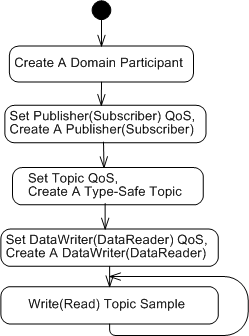
The UML activity diagram below illustrates the steps for setting up and sending (receiving) topic samples over DDS: define a domain; create a domain participant; create a QoS configured, domain-resident publisher (or subscriber); create a QoS configured and type-safe topic; create a QoS configured, publisher-resident, and topic-specific dataWriter; and then go!
Concrete C++ implementations of the activity diagram, snipped from Angelo’s presentation, are presented below. Note the incorporation of overloaded insertion operators and class templates in the new API. Relatively short and sweet, no?
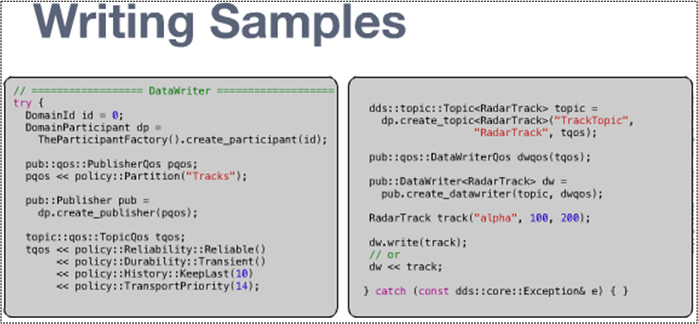
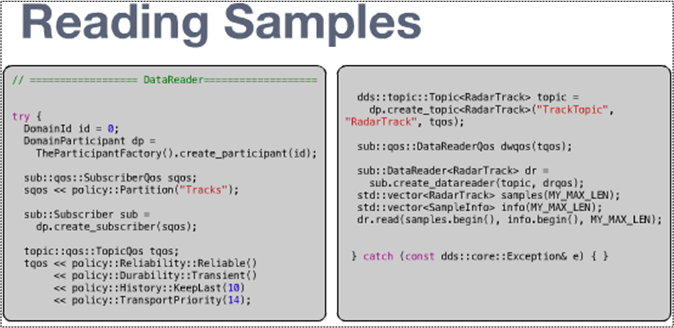
Even though the sample code shows non-blocking, synchronous send/receive usage, DDS, like any other communication service worth its salt, provides API support for blocked synchronous and asynchronous notification usage.
So, what are you waiting for? Skidaddle over to PrismTech’s OpenSplice DDS page, download the community edition libraries for your platform, and start experimenting!
SysML, UML, MML
I really like the SysML and UML for modeling and reasoning about complex, multi-technology and software-centric systems respectively, but I think they have one glaring shortcoming. They aren’t very good at modeling distributed, multi-process, multi-threaded systems. Why? Because every major element (except for a use case?) is represented as a rectangle. As far as I know, a process can be modeled as either a parallelogram or a stereotyped rectangular UML class (SysML block ):

To better communicate an understanding of multi-threaded, multi-process systems, I’ve created my own graphical “proprietary” (a.k.a. homegrown) symbology. I call it the MML (UML profile). Here is the MML symbol set.

An example MML diagram of a design that I’m working on is shown below. The app-specific modeling element names have been given un-descriptive names like ATx, APx, DBx, Mx for obvious reasons.
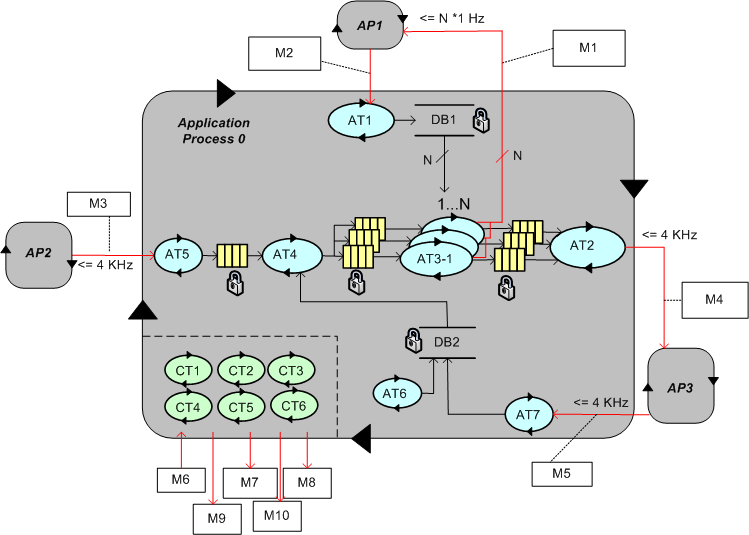
Compare this model with the equivalent rectangular UML diagram below. I purposely didn’t use color and made sure it was bland so that you’d answer the following question the way I want you to. Which do you think is more expressive and makes for a better communication and reasoning tool?

If you said “the UML diagram is better“, that’s OK. 🙂
Which One, And When?
Option A and Option B in the UML figure below show two different ways of presenting the same 3-function interface to “other” code users. Under which conditions would you choose one design over the other?
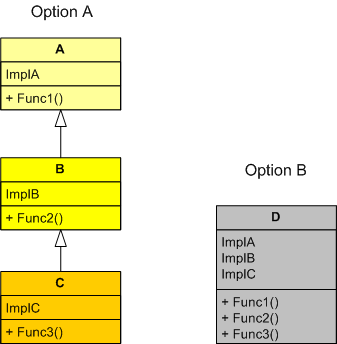
Because I prefer simplicity over complexity and local dependency over distant dependency, I’d prefer option B over option A if I was reasonably sure that classes A and B wouldn’t be useful in another inheritance tree or useful as leaf classes. Even if I chose wrongly, because all the functionality is encapsulated within one class in option B, it wouldn’t be a huge risk for a user to extract out B or C class sub-functionality from D and customize it for his/her use by placing it in his/her own separate E class. In this case, no other existing clients of class D would be affected, but the trade off is the introduction of duplicate code into the code base. If I chose the option A inheritance tree, this wouldn’t be the case. In option A, if a user was allowed to directly change A and/or B in-situ, then the duplicate code “wart” wouldn’t manifest, but the risk of breaking the existing code of other users of the A, B, and/or C classes would be high compared to the alternative. Do you see any holes in this decision logic?
Push And Pull Message Retrieval
The figure below models a two layer distributed system. Information is exchanged between application components residing on different processor nodes via a cleanly separated, underlying communication “layer“. App-to-App communication takes place “virtually“, with the arcane, physical, over-the-wire, details being handled under the covers by the unheralded Comm layer.
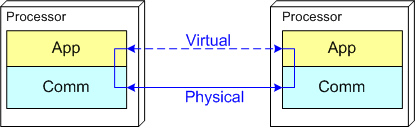
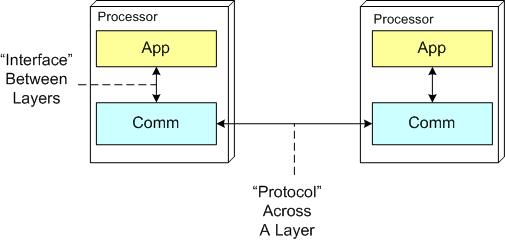
In the ISO OSI reference model for inter-machine communication, the vertical linkage between two layers in a software stack is referred to as an “interface” and the horizontal linkage between two instances of a layer running on different machines is called a “protocol“. This interface/protocol distinction is important because solving flow-control and error-control issues between machines is much more involved than handling them within the sheltered confines of a single machine.
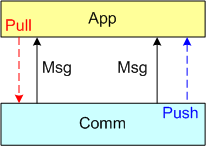
In this post, I’m going to focus on the receiving end of a peer-to-peer information transfer. Specifically, I’m going to explore the two methods in which an App component can retrieve messages from the comm layer: Pull and Push. In the “Pull” approach, message transfer from the Comm layer to the App layer is initiated and controlled by the App component via polling. In the “Push” method, inversion of control is employed and the Comm layer initiates/controls the transfer by invoking a callback function installed by the App component on initialization. Any professional Comm subsystem worth its salt will make both methods of retrieval available to App component developers.
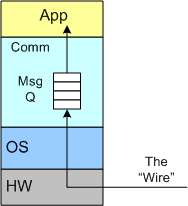
The figure below shows a model of a comm subsystem that supplies a message queue between the application layer and the “wire“. The purpose of this queue is to prevent high rate, bursty, asynchronous message senders from temporarily overwhelming slow receivers. By serving as a flow rate smoother, the queue gives a receiver App component a finite amount of time to “catch up” with bursts of messages. Without this temporary holding tank, or if the queue is not deep enough to accommodate the worst case burst size, some messages will be “dropped on the floor“. Of course, if the average send rate is greater than the average processing rate in the receiving App, messages will be consistently lost when the queue eventually overflows from the rate mismatch – bummer.
The UML sequence diagram below zeroes in on the interactions between an App component thread of execution and the Comm layer for both the “Push” and “Pull” methods of message retrieval. When the “Pull” approach is implemented, the OS periodically activates the App thread. On each activation, the App sucks the Comm layer queue dry; performing application-specific processing on each message as it is pulled out of the Comm layer. A nice feature of the “Pull” method, which the “Push” method doesn’t provide, is that the polling rate can be tuned via the sleep “Dur(ation)” parameter. For low data rate message streams, “Dur” can be set to a long time between polls so that the CPU can be voluntarily yielded for other processing tasks. Of course, the trade-off for long poll times is increased latency – the time from when a message becomes available within the Comm layer to the time it is actually pulled into the App layer.
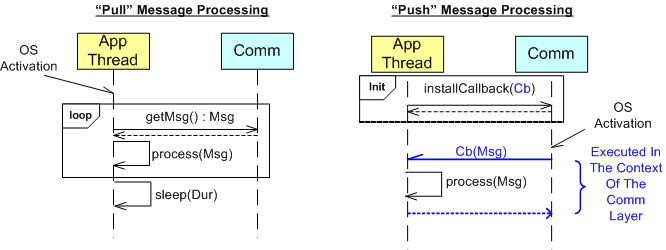
In the”Push” method of message retrieval, during runtime the Comm layer activates the App thread by invoking the previously installed App callback function, Cb(Msg), for each newly received message. Since the App’s process(Msg) method executes in the context of a Comm layer thread, it can bog down the comm subsystem and cause it to miss high rate messages coming in over the wire if it takes too long to execute. On the other hand, the “Push” method can be more responsive (lower latency) than the “Pull” method if the polling “Dur” is set to a long time between polls.
So, which method is “better“? Of course, it depends on what the Application is required to do, but I lean toward the “Pull” Method in high rate streaming sensor applications for these reasons:
- In applications like sensor stream processing that require a lot of number crunching and/or data associations to be performed on each incoming message, the fact that the App-specific processing logic is performed within the context of the App thread in the “Pull” method (instead of the Comm layer) means that the Comm layer performance is not dependent on the App-specific performance. The layers are more loosely coupled.
- The “Pull” approach is simpler to code up.
- The “Pull” approach is tunable via the sleep “Dur” parameter.
How about you? Which do you prefer, and why?
My Erlang Learning Status – II
In my quest to learn the Erlang programming language, I’ve been sloowly making my way through Cesarini and Thompson’s wonderful book: “Erlang Programming“.
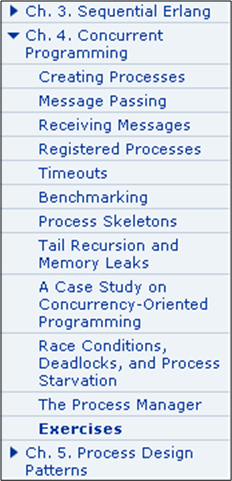
In terms of the book’s table of contents, I’ve just finished reading Chapter 4 (twice):
As I expected, programming concurrent software systems in Erlang is stunningly elegant compared to the language I currently love and use, C++. In comparison to C++ and (AFAIK) all the other popularly used programming languages, concurrency was designed into the language from day one. Thus, the amount of code one needs to write to get a program comprised of communicating processes up and running is breathtakingly small.
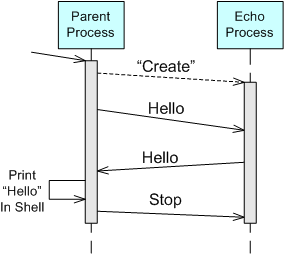
For example, take a look at the “bent” UML sequence diagram of the simple two process “echo” program below. When the parent process is launched by the user, it spawns an “Echo” process. The parent process then asynchronously sends a “Hello” message to the “Echo” process and suspends until it receives a copy of the “Hello” message back from the “Echo” process. Finally, the parent process prints “Hello” in the shell, sends a “Stop” message to the “Echo” process, and self-terminates. Of course, upon receiving the “Stop” message, the “Echo” process is required to self-terminate too.
Here’s an Erlang program module from the book that implements the model:
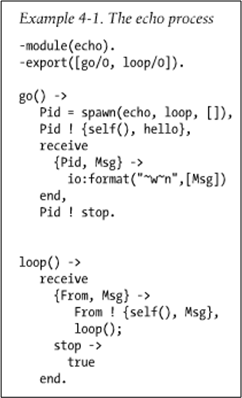
The go() function serves as the “Parent” process and the loop() function maps to the “Echo” process in the UML sequence diagram. When the parent is launched by typing “echo:go().” into the Erlang runtime shell, it should:
- Spawn a new process that executes the loop() function that co-resides in the echo module file with the go() function.
- Send the “Hello” message to the “Echo” process (identified by the process ID bound to the “Pid” variable during the return from the spawn() function call) in the form of a tuple containing the parent’s process ID (returned from the call to self()) and the “hello” atom.
- Suspend (in the receive-end clause) until it receives a message from the “Echo” process.
- Print out the content of the received “Msg” to the console (via the io:format/2 function).
- Issue a “Stop” message to the “Echo” process in the form of the “stop” atom.
- Self-terminate (returning control and the “stop” atom to the shell after the Pid ! stop. expression).
When the loop() function executes, it should:
Suspend in the receive-end clause until it receives a message in the form of either: A) a two argument tuple – from any other running process, or, B) an atom labeled “stop“.
- If the received message is of type A), send a copy of the received Msg tuple argument back to the process whose ID was bound to the From variable upon message reception. In addition to the content of the Msg variable, the transmitted message will contain the loop() process ID returned from the call to self(). After sending the tuple, suspend again and wait for the next message (via the recursive call to loop()).
- If the received message is of type B), self-terminate.
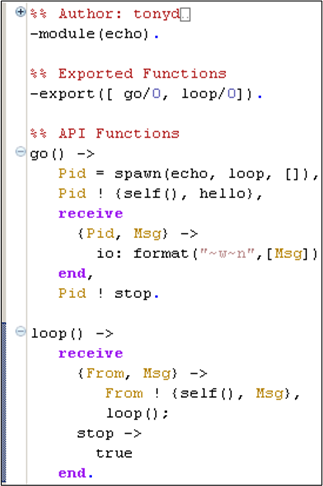
I typed this tiny program into the Eclipse Erlide plugin editor:
After I compiled the code, started the Erlang VM in the Eclipse console view, and ran the program, here’s what I got:
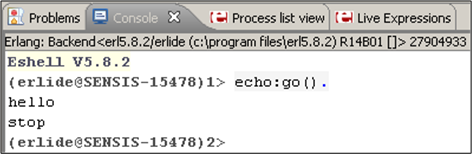
It worked like a charm – Whoo Hoo! Now, imagine what an equivalent, two process, C++ program would look like. For starters, one would have to write, compile, and run two executables that communicate via sockets or some other form of relatively arcane inter-process OS mechanism (pipe, shared memory, etc), no? For a two thread, single process C++ equivalent, a threads library must be used with some form of synchronized inter-thread communication (2 lockless ring buffers, 2 mutex protected FIFO queues, etc).
Note: If you’re interested in reading my first Erlang learning status report, click here.
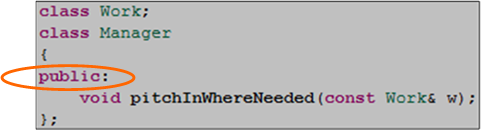
void Manager::pitchInWhereNeeded(const Work& w){}
Unless you’re a C++ programmer, you probably won’t understand the title of this post. It’s the definition of the “pitchInWhereNeeded” member function of a “Manager” class. If you look around your immediate vicinity with open eyes, that member function is most likely missing from your Manager class definition. If you’re a programmer, oops, I mean a software engineer, it’s probably also missing from your derived “SoftwareLead“, “SoftwareProjectManager“, and “SoftwareArchitect” classes too.
As the UML-annotated figure below shows, in the early twentieth century the “pitchInWhereNeeded” function was present and publicly accessible by other org objects. On revision number 1 of the “system”, as signaled by the change from “+” to “-“, its access type was changed to private. This seemingly minor change broke all existing “system” code and required all former users of the class to redesign and retest their code. D’oh!
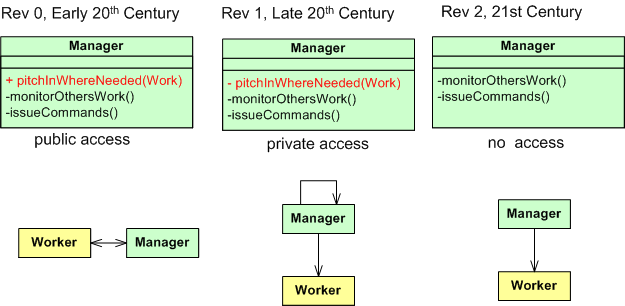
On the second revision of the Manager class, this critical, system-trust-building member function mysteriously disappeared completely. WTF?. This rev 2 version of the code didn’t break the system, but the system’s responsiveness decreased since private self -calls by manager objects to the “pitchInWhereNeeded” function were deleted and more work was pushed back into the “other” system objects. Bummer.
whatIsThisFor
Check out this C++ code fragment at the beginning of the MessageBase class template definition:

After staring at it for a few minutes, I was able to distill the essence of the idiom(???) used in the code as:
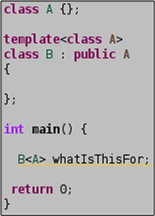
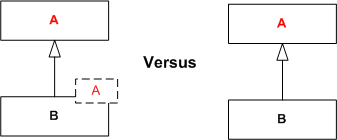
I can’t figure out why B was designed as a class template and not just a plain ole’ class that simply inherits from A (see below). It reminds me a little of the CRTP idiom but it’s not the same. Would you happen to know what problems it is intended to solve? Is it some template meta-programming technique?
OMG! Design By Committee
In Federico Biancuzzi’s terrific “Masterminds Of Programming“, Federico interviews the three Amigo co-creators of UML. In discussing the “advancement” of the UML after the Amigos freely donated their work to the OMG for further development, Jim Rumbaugh had this to say:
The OMG (Object Management Group) is a case study in how political meddling can damage any good idea. The first version of UML was simple enough, because people didn’t have time to add a lot of clutter. Its main fault was an inconsistent viewpoint—some things were pretty high-level and others were closely aligned to particular programming languages. That’s what the second version should have cleared up. Unfortunately, a lot of people who were jealous of our initial success got involved in the second version. – Jim Rumbaugh
LOL! Following up, Jim landed a second blow:
The OMG process allowed all kinds of special interests to stuff things into UML 2.0, and since the process is mainly based on consensus, it is almost impossible to kill bad ideas. So UML 2.0 became a bloated monstrosity, with far too much dubious content, and still no consistent viewpoint and no way to define one. – Jim Rumbaugh
Double LOL!
Another UML co-creator, Grady Booch, says essentially the same thing but without specifically mentioning the OMG cabal:
UML 2.0 to some degree, and I’ll say this a little bit harshly, suffered a bit of a second system effect in that there were great opportunities and special interest groups, if you will, clamoring for certain specific features which added to the bloat of UML 2.0. – Grady Booch
Triple LOL!
Mitchi Henning, a key player during the CORBA era, rants about the OMG in this controversial “The Rise And Fall Of CORBA” article. Mitchi enraged the corbaholic community by lambasting both CORBA and the dysfunctional OMG politburo that maintains it:
Over the span of a few years, CORBA moved from being a successful middleware that was hailed as the Internet’s next-generation e-commerce infrastructure to being an obscure niche technology that is all but forgotten. This rapid decline is surprising. How can a technology that was produced by the world’s largest software consortium fall from grace so quickly? Many of the reasons are technical: poor architecture, complex APIs, and lack of essential features all contributed to CORBA’s downfall. However, such technical shortcomings are a symptom rather than a cause. Ultimately, CORBA failed because its standardization process virtually guarantees poor technical quality. Seeing that other standards consortia use a process that is very similar, this does not bode well for the viability of other technologies produced in this fashion. – Mitchi Henning
Maybe the kings and queens of the OMG should add an exclamation point to the end of their acronym: OMG!
The reason the OMG! junta interests me is because I’ve been working hands-on with RTI‘s implementation of the OMG Data Distribution Service (DDS) standard to design and build the infrastructure for a distributed sensor data processing server that will be embedded in a safety-critical supersystem. At this point in time, since DDS was co-designed, tested, and fielded by two commercial companies and it wasn’t designed from scratch by a big OMG committee, I think it’s a terrific standard. Particularly, I think RTI’s version is spectacular relative to the other two implementations that I know about. I hope the OMG! doesn’t transform DDS into an abomination………

XML In UML
While learning XML, I concocted this UML class diagram of the conceptual structure of XML as a quick look refresher guide:

The diagram can be interpreted as:
- A typical XML document is composed of a “Document Element“, an optional “Prolog Element”, and many application specific “Element” classes.
- Besides a base “Element” class, there are two subclass types: the “Document Element” and the “Prolog Element”.
- In an XML file, the “Prolog Element” (if present) must precede the “Document Element”.
- An element contains content and, optionally, 1 or more “Attributes”.
- Each “Attribute” is comprised of a Name/Value pair.
- An element can also contain other nested elements, providing support for structured data representation.
Here’s a simple concrete example XML file and the mapping from concrete to abstract. Note that the “comment” and “xml declaration” lines aren’t represented in the abstract class diagram model. I left out that second order level of detail to keep the class diagram simple.

Unconstraining UML And SysML Modeling Tools
For informal, rapid, and iterative design modeling and intra-team communication, I use the freely downloadable and unconstraining UML and SysML stencil plugins for visio. These handy little stencils are available here: Visio UML and SysML stencils homepage. When installed and opened, the shapes window may look like the figure below. Of course, you can control which shapes sub-windows you’d like to display and use within a document via the file->shapes menu selection. Open all 11 of them if you’d like!
If you compare the contents of the two sets of shape stencils, since UML is a subset and extension of UML you’ll unsurprisingly find a lot of overlap in the smart symbol sets. Note that unlike the two UML stencils, the set of nine SysML stencils are “SysML Diagram” oriented. Because of this diagram-centric decomposition, I find myself using the SysML stencils more than the UML stencils.
 To use the stencils, you just grab, drag, and drop symbols onto the canvas; tying them together with various connector symbols. Of course, each symbol is “smart”, so right-clicking on a shape triggers a context sensitive menu that gives you finer control over the attributes and display properties of the shape.
If you don’t want to open the stencils manually, you can create either a new SysML or UML document from the templates that are co-installed with the stencils (file->new->choose drawing type->SysML). In this case, either the 2 UML stencils, or all 9 SysML stencils are auto-opened when the first page of the new document is created and displayed. I often use the multi-page feature of visio to create a set of associated behavior and structure diagrams for the design that I’m working on, or to reverse-engineer a section of undecipherable code that I’m struggling to understand.
If you’re a visio user and you’re looking to learn UML and/or SysML, I think experimenting with these stencils is a much better learning alternative than using one of the big, formal, and more hand-cuffing tools like Artisan Studio or Sparx Enterprise Architect. You can “Bend it like Fowler” much more easily with the visio stencils approach and not get frustrated as often.

Why am I here?
WTF?
Meh!
D'oh!

My BTC Address



 Bulldozer00's Blog