Archive
How’s Your GoF Swing?
I don’t think many software professionals would disagree with the assertion that one of the greatest and innovative software design books of all time is “Design Patterns” by the Gang of Four (GoF). According to these PGA GoFfers, one dimensional software developers who only cut code and are “above” documenting behavioral and structural views of their designs do everyone a great disservice, especially themselves. Here’s why:
An object-oriented program’s run-time structure often bears little resemblance to its code structure. The code structure is frozen at compile-time; it consists of classes in fixed inheritance relationships. A program’s run-time structure consists of rapidly changing networks of communicating objects. In fact, the two structures are largely independent. Trying to understand one from the other is like trying to understand the dynamism of living ecosystems from the static taxonomy of plants and animals, and vice versa. With such disparity between a program’s run-time and compile-time structures, it’s clear that code won’t reveal everything about how a system will work. – Design Patterns, GoF.
Here’s the double whammy from UML co-creator Grady Booch.
The (source) code is the truth, but not the whole truth. – Grady Booch
I interpret these quotes to mean that without supporting “artifacts” (I use the less offensive “a” word here because “documentation” to most programmers is the equivalent of a four letter word.) to aid in understanding, maintenance developers and new team members and even the original coders are hosed. Of course, it goes without saying that their organizations and customers are hosed too. The hosing may be later than sooner, but the hosing will take place.
“The bitterness of poor system performance remains long after the sweetness of low prices and prompt delivery are forgotten.” – Jerry Lim
When one dimensional programmers are combined with one dimensional, schedule-is-the-only-thing-that-matters BMs who don’t care to know squat about software other than that the code is “done”, a toxic and self-reinforcing 2 X 1D brew of inefficiency and endless downstream rework is guaranteed. No superficial org restructurings, process improvement initiatives, excellence committees, or executive orders can solve deeply rooted quality problems like this. Bummer.
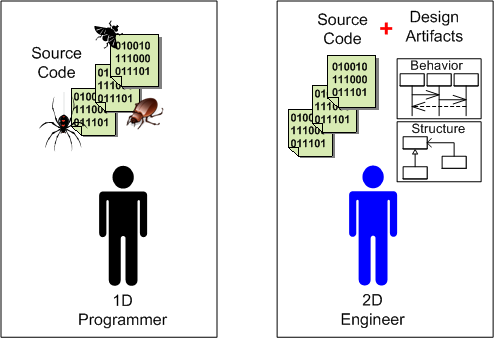 So what’s the advice that goes with this typical Bulldozer00 rant? Learn UML (on your own time; see the quote below) and develop your software from end-to-end with a process that interlaces coding and “artifacting” similar to PAYGO.
“I hold great hopes for UML, which seems to offer a way to build products that integrates hardware and software, and that is an intrinsic part of development from design to implementation. But UML will fail if management won’t pay for quite extensive training, or toss the approach when panic reigns.” – Jack Gannsle
My version of Jack’s quote replaces the “if” with “when”.
Unconstraining UML And SysML Modeling Tools
For informal, rapid, and iterative design modeling and intra-team communication, I use the freely downloadable and unconstraining UML and SysML stencil plugins for visio. These handy little stencils are available here: Visio UML and SysML stencils homepage. When installed and opened, the shapes window may look like the figure below. Of course, you can control which shapes sub-windows you’d like to display and use within a document via the file->shapes menu selection. Open all 11 of them if you’d like!
If you compare the contents of the two sets of shape stencils, since UML is a subset and extension of UML you’ll unsurprisingly find a lot of overlap in the smart symbol sets. Note that unlike the two UML stencils, the set of nine SysML stencils are “SysML Diagram” oriented. Because of this diagram-centric decomposition, I find myself using the SysML stencils more than the UML stencils.
 To use the stencils, you just grab, drag, and drop symbols onto the canvas; tying them together with various connector symbols. Of course, each symbol is “smart”, so right-clicking on a shape triggers a context sensitive menu that gives you finer control over the attributes and display properties of the shape.
If you don’t want to open the stencils manually, you can create either a new SysML or UML document from the templates that are co-installed with the stencils (file->new->choose drawing type->SysML). In this case, either the 2 UML stencils, or all 9 SysML stencils are auto-opened when the first page of the new document is created and displayed. I often use the multi-page feature of visio to create a set of associated behavior and structure diagrams for the design that I’m working on, or to reverse-engineer a section of undecipherable code that I’m struggling to understand.
If you’re a visio user and you’re looking to learn UML and/or SysML, I think experimenting with these stencils is a much better learning alternative than using one of the big, formal, and more hand-cuffing tools like Artisan Studio or Sparx Enterprise Architect. You can “Bend it like Fowler” much more easily with the visio stencils approach and not get frustrated as often.
Accessing Configuration Data
Assume that on initialization, your C++ application reads in a bunch of configuration parameters from secondary storage prior to commencing its runtime mission. Via a trio of simple UML class diagrams, the figure below shows three ways (patterns?) to structure your application to read in and store configuration data for subsequent use by the program‘s productive, value added classes (user1, user2, etc).
In the first design, a singleton class is used to read and store the runtime configuration in RAM. The singleton can either be auto-instantiated at program load time in global/namespace memory before main() executes, or the first time it is accessed by one of the program’s user objects.
In the second approach, you employ a “ConfigOwner” class that encapsulates and owns the configuration data reader class (AppConfig). On program startup, the “ConfigOwner” object instantiates the “AppConfig” reader object and then subsequently passes a reference/pointer to it to all the user objects (which the “ConfigOwner” object doesn’t own).
In the third strategy, a higher level object (AppEncapsulator) owns all other objects in the application. On startup, this parent class is instantiated first. It fully controls the initialization sequence, creating the “AppConfig” object first and then pushing a reference/pointer to it down to its child User class objects when it subsequently constructs them.
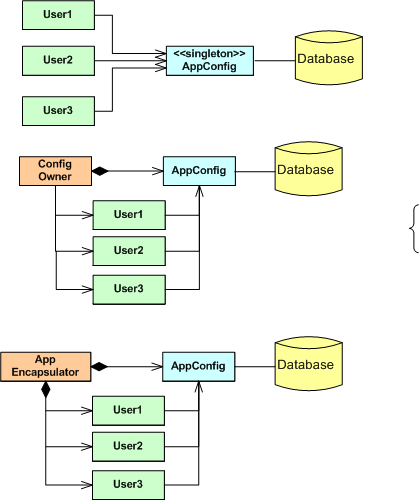
Since the application startup sequence is centrally controlled, the third, parent-child approach is totally thread-safe. The implementation of the singleton approach, where the singleton is instantiated at program load time before main() starts executing, is also thread safe. The instantiation-on-first-access singleton approach and the ConfigOwner approach are subtlely thread unsafe without some clever synchronization coding added to ensure that the AppConfig object is fully constructed before it is accessed by its users.
Since I’m not fond of using singletons in situations where they’re not absolutely required (and this is arguably one of those cases, no?) and I disdain “clever” coding, I prefer the last, centrally controlled strategy. How about you? Are you clever, or a simpleton like me?
Note: Don’t mind the bracket turd on the right of the diagram. Since I’m a lazy ass and I try not to be a perfectionist when perfection is not needed, I left the pooper in rather than removing, fixing, and reinserting the graphic into the post. Too much work.
To Call, Or To Be Called. THAT Is The Question.
Except for GUIs, I prefer not to use frameworks for application software development. I simply don’t like to be the controllee. I like to be the controller; to be on top so to speak. I don’t like to be called; I’d rather call.
The UML figure below shows a simple class diagram and sequence diagram pair that illustrate how a typical framework and an application interact. On initialization, your code has to install a bunch of CallBack (CB) functions or objects into the framework. After initialization, your code then waits to be called by the framework with information on Events (E) that you’re interested in processing. You’re code is subservient to the Framework Gods.
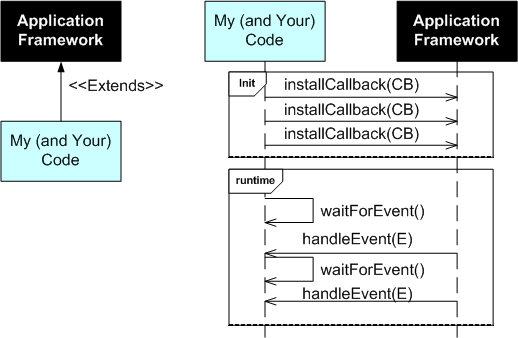
After object oriented inheritance and programming by difference, frameworks were supposed to be the next silver bullet in software reuse. Well crafted, niche-based frameworks have their place of course, but they’re not the rage they once were in the 90s. A problem with frameworks, especially homegrown ones, is that in order to be all things to all people, they are often bloated beyond recognition and require steep learning curves. They also often place too much constraint on application developers while at the same time not providing necessary low level functionality that the application developer ends up having to write him/herself. Finding out what you can and can’t do under the “inverted control” structure of a framework is often an exercise in frustration. On the other hand, a framework imposes order and consistency across the set of applications written to conform to it’s operating rules; a boon to keeping maintenance costs down.
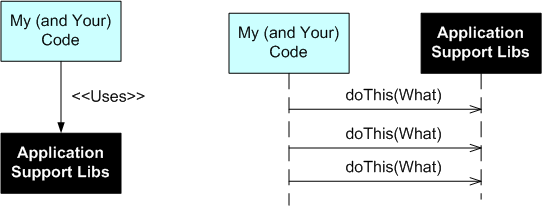
The alternative to a framework is a set of interrelated, but not too closely coupled, application domain libraries that the programmer (that’s you and me) can choose from. The UML class and sequence diagram pair below shows how application code interacts with a set of needed and wanted support libraries. Notice who’s on top.
 How about you? Do you like to be on top? What has been your experience working with non-GUI application frameworks? How about system-wide frameworks like CORBA or J2EE?
Cleanliness And Understandability
While adding code to our component library framework yesterday, a colleague and myself concocted a 2 attribute quality system for evaluating source code:
 When subjectively evaluating the cleanliness attribute of a chunk of code, we pretty much agree on whether it is clean or dirty. The trouble is our difference in evaluating understandability. My obfuscated is his simple. Bummer.
Anomalously Huge Discrepancies
I’m currently having a blast working on the design and development of a distributed, multi-process, multi-threaded, real-time, software system with a small core group of seasoned developers. The system is being constructed and tested on both a Sparc-Solaris 10 server and an Intel-Ubuntu Linux 2.6.x server. As we add functionality and grow the system via an incremental, “chunked” development process, we’re finding anomalously huge discrepancies in system build times between the two platforms.
The table below quantifies what the team has been qualitatively experiencing over the past few months. Originally, our primary build and integration machine was the Solaris 10 server. However, we quickly switched over to the Linux server as soon as we started noticing the performance difference. Now, we only build and test on the Solaris 10 server when we absolutely have to.
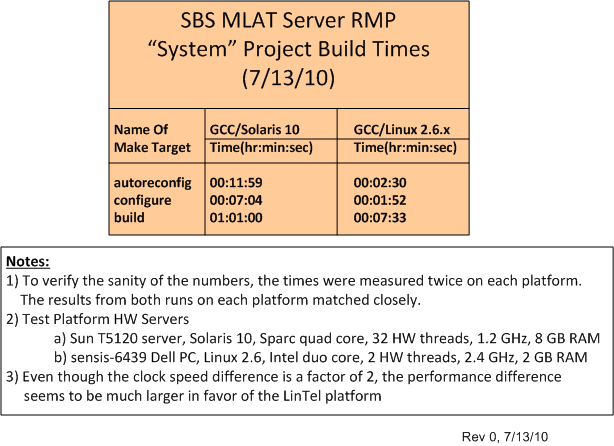
The baffling aspect of the situation is that even though the CPU core clock speed difference is only a factor of 2 between the servers, the build time difference is greater than a factor of 5 in favor of the ‘nix box. In addition, we’ve noticed big CPU loading performance differences when we run and test our multi-process, multi-threaded application on the servers – despite the fact that the Sun server has 32, 1.2 GHz, hardware threads to the ‘nix server’s 2, 2.4 GHz, hardware threads. I know there are many hidden hardware and software variables involved, but is Linux that much faster than Solaris? Got any ideas/answers to help me understand WTF is going on here?
Call Tree
Check out the call thicket, oops, I mean call tree, below. From the root main() node, you can deduce that the 26 function program is written in C. Actually, there are several more than 26 functions because a few of the functions in the model call other lower level functions not shown in the figure.
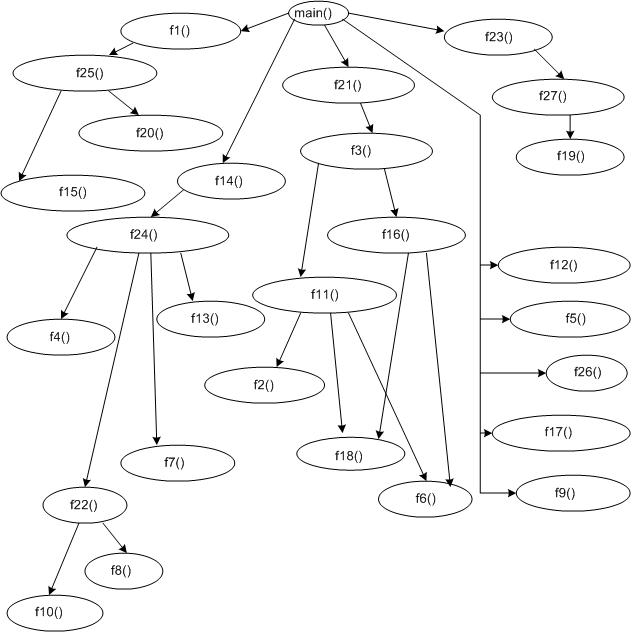
Even though the functions are cloaked in a sequential numbering scheme, they’re not neatly called one right after another. Intertwined between, around, and across the function calls are a bunch of nested if-then and switch-case statements that make the mess more intimidating. Execution path sequencing is controlled by > 20 statically loaded configuration parameters and several dynamically computed control parameters.
I’ve got to transform this beast into an object oriented C++ design and verify that the new design works. Of course, there are no existing unit, integration, or system tests to reuse. Wish me luck!
ICONIX SysML Training Postscript
Since I’ve noticed that my ICONIX SysML training preview post has received quite a few hits over the past several months and I haven’t written a followup post, I decided that now is the time to do it.
The Bad
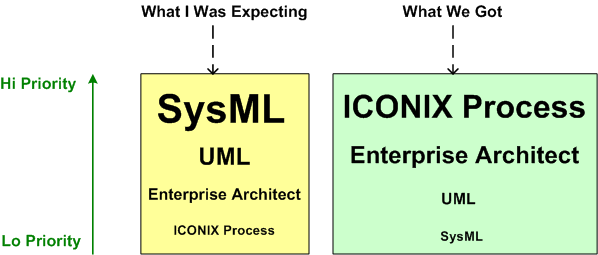
When the course was over, I felt very disappointed. Instead of focusing on SysML – which is embedded in the title of the course, SysML was given second class treatment and the main thrusts were centered on:
- Teaching the usage of the big and sprawling Enterprise Architect software modeling and code generation tool
- Teaching a “bent”, non-standard, subset of UML that supports ICONIX’s homegrown software design process: “Use Case Driven Object Modeling“
Only the last (not first) one third of the class handout covered the SysML diagrams and symbolology while the first two thirds covered UML, albeit in a subserviant role to the ICONIX process.
The Good
Although the examples in the handout material were all geared toward database-centric business transaction systems, but my company is in the business of building real-time sensor systems, the teachers facilitated the real time development of a set of use cases, robustness diagrams, and class diagrams for the sensor project we were kicking off. It was a worthwhile team building experience and it surfaced a boatload of ambiguities and misunderstandings between team members. The teachers were skilled facilitators and they did a great job keeping things moving briskly while remaining in the background and not dominating the working sessions.
The Summary
Monolithic Redesign
On my latest assignment, I have to reverse engineer and understand a large monolithic block of computationally intense, single-threaded product code that’s been feature-enhanced and bug-fixed many times, by many people, over many years (sound familiar?). In addition to the piled on new features, a boatload of nested if-else structures has been injected into the multi-K SLOC code base over the years to handle special and weird cases observed and reported in from the field.
As you can guess, it’s no one’s fault that the code is a tangled mess. It’s because the second law of thermodynamics has been in action doing its dirty work destroying the system without being periodically harnessed by scheduled acts of husbandry. A handful of maintenance developers imbued with a sense of personal responsibility and ownership have tried their best to refactor the beast into submission; under the radar.
Because the code is CPU intensive and single threaded, it’s not scalable to higher input data rates and its viability has hit “the wall”. Thus, besides refactoring the existing functionality into a more maintainable design, I have to simultaneously morph the mess into a multi-threaded structure that can transparently leverage the increased CPU power supplied by multicore hardware.

Note that redesigning for distributed flexibility and higher throughput doesn’t come for free. Essential complexity is added and additional latency is incurred because each input sample must traverse the 3 thread pipeline.
Piece of cake, no? Since lowly “programmers” are interchangeable, anyone could do it, right? I love this job and I’m having a blast!
Console And Files First, GUI And Database Last
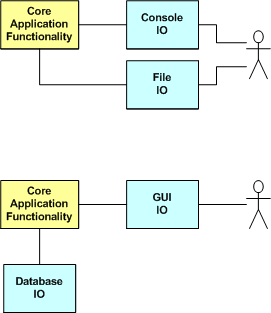
Adding Database IO and GUI IO to a program ratchets up it’s complexity, and hence development time, immensely. In “Programming: Principles and Practice Using C++“, Bjarne Stroustrup recommends designing and writing your program to do IO over the console and filesystem first, and then adding GUI IO and database IO later. And only if you have to.
Eliminating, or at least delaying, GUI and database IO forces you to focus on getting the internal application design right early. It also helps to keep you from tangling the GUI IO and database IO code with your application code and creating an unmaintainable ball of mud. Thirdly, the practice also makes testing much simpler than trying to write and debug the whole quagmire at once. Good advice?

Why am I here?
WTF?
Meh!
D'oh!

My BTC Address



 Bulldozer00's Blog