Archive
iSpeed OPOS
A couple of years ago, I designed a “big” system development process blandly called MPDP2 = Modified Product Development Process version 2. It’s version 2 because I screwed up version 1 badly. Privately, I named it iSpeed to signify both quality (the Apple-esque “i”) and speed but didn’t promote it as such because it didn’t sound nerdy enough. Plus, I was too chicken to introduce the moniker into a conservative engineering culture that innocently but surely suppresses individuality.
One of the MPDP2 activties, which stretches across and runs in parallel to the time sequenced development phases, is called OPOS = Ongoing Planning, Ongoing Steering. The figure below shows the OPOS activity gaz-intaz and gaz-outaz.
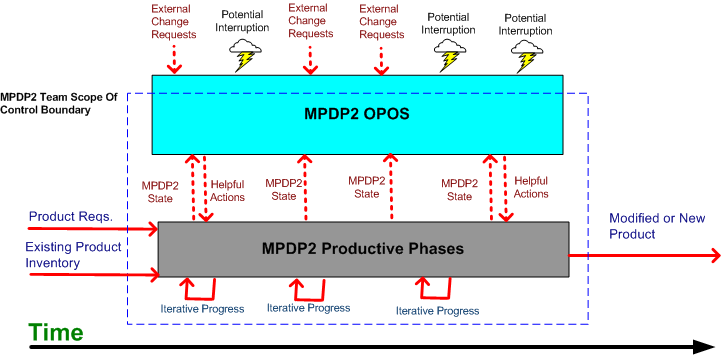
In the iSpeed process, the top priority of the project leader (no self-serving BMs allowed) is to buffer and shield the engineering team from external demands and distractions. Other lower priority OPOS tasks are to periodically “sample the value stream”, assess the project state, steer progress, and provide helpful actions to the multi-disciplined product development team. What do you think? Good, bad, fugly? Missing something?
Plumbers And Electricians
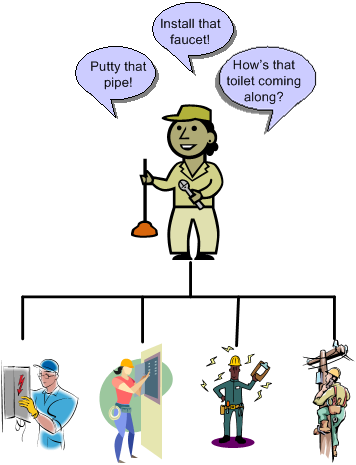
Putting an expert in one technical domain “in charge” of a big risky project that requires deep expertise in a different technical domain is like putting plumbers in charge of a team of electricians on a massive skyscraper electrical job – or vice versa. Putting a generic PMI or MBA trained STSJ in charge of a complex, mixed-discipline engineering product development project is even worse. When they don’t know anything about WTF they’re managing, how can innocently ignorant project “leaders”:
- Understand what needs to be done
- Know what information artifacts need to be generated along the way for downstream project participants
- Estimate and plan the work with reasonable accuracy
- Correctly interpret ongoing status so that they have an idea where the project is located in terms of cost, schedule, and quality
- Make effective mid-course corrections when things go awry and ambiguity reigns
- See through any bullshit used to camouflage shoddy work or to cut corners,
- Stop small but important problems from falling through the cracks and growing into ominously huge obstacles
- Perform the “verify” part of “trust but verify”.
Well, they can’t – no matter how many impressive and glossy process templates are stored in the standard corpo database to guide them. Thus, these poor dudes spend most of their time spinning out massive, impressive excel spreadsheets and microsoft project schedules so fine grained that they’re obsolete before they’re showcased to the equally clueless suits upstairs. But hey, everything looks good on the surface for a long stretch of time. Uh, until the fit hits the shan.
Maker’s Schedule, Manager’s Schedule
I read this Paul Graham essay quite a while ago; Maker’s Schedule, Manager’s Schedule, and I’ve been wanting to blog about it ever since. Recently, it was referred to me by others at least twice, so the time has come to add my 2 cents.
In his aptly titled essay, Paul says this about a manager’s schedule:
The manager’s schedule is for bosses. It’s embodied in the traditional appointment book, with each day cut into one hour intervals. You can block off several hours for a single task if you need to, but by default you change what you’re doing every hour.
Regarding the maker’s schedule, he writes:
But there’s another way of using time that’s common among people who make things, like programmers and writers. They generally prefer to use time in units of half a day at least. You can’t write or program well in units of an hour. That’s barely enough time to get started. When you’re operating on the maker’s schedule, meetings are a disaster.

When managers graduate from being a maker and morph into bozos (of which there are legions), they develop severe cases of ADHD and (incredibly,) they “forget” the implications of the maker-manager schedule difference. For these self-important dudes, it’s status and reporting meetings galore so that they can “stay on top” of things and lead their teams to victory. While telling their people that they need to become more efficient and productive to stay competitive, they shite in their own beds by constantly interrupting the makers to monitor status and determine schedule compliance. The sad thing is that when the unreasonable schedules they pull out of their asses inevitably slip, the only technique they know how to employ to get back on track is the ratcheting up of pressure to “meet schedule”. They’re bozos, so how can anyone expect anything different – like asking how they could personally help out or what obstacles they can help the makers overcome. Bummer.
Staffing Profiles
The figure below shows the classic smooth and continuous staffing profile of a successful large scale software system development project. At the beginning, a small cadre of technical experts sets the context and content for downstream activity and the group makes all the critical, far reaching architectural decisions. These decisions are documented in a set of lightweight, easily accessible, and changeable “artifacts” (I try to stay away from the word “documentation” since it triggers massive angst in most developers).
If the definitions of context and content for the particular product are done right, the major incremental development process steps that need to be executed will emerge naturally as byproducts of the effort. An initial, reasonable schedule and staffing profile can then be constructed and a project manager (hopefully not a BM) can be brought on-board to serve as the PHOR and STSJ.

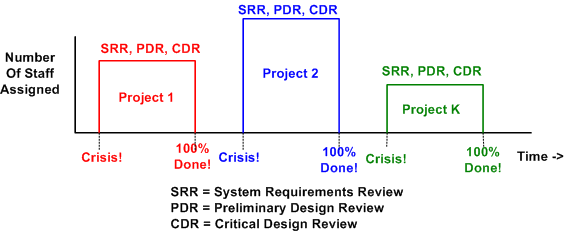
Sadly, most big system developments don’t trace the smooth profiling path outlined above. They are “planned” (if you can actually call it planning) and executed in accordance with the figure below. No real and substantive planning is done upfront. The standard corpo big bang WBS (Work Breakdown Structure) template of analysis/SRR/design/PDR/CDR/coding/test is hastily filled in to satisfy the QA police force and a full, BM led team is blasted at the project. Since dysfunctional corpocracies have no capacity to remember or learn, the cycle of mediocre (at best) performance is repeated over and over and over. Bummer.
Zero Cost Risk Mitigation
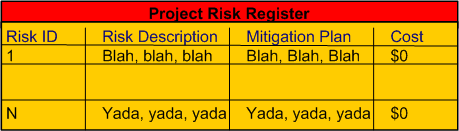
Why do managers and executives require project technical leaders to develop comprehensive “risk mitigation plans” while at the same time fully expecting the plans to cost nothing (no people, no time, no money). Formal and rigorously filled out risk registers (with no cost column) make it look like due diligence is being performed, but it’s all a ruse to sustain the illusion that management is “in control”. WTF?
A Costly Mistake?
Assume the following:
- Your flagship software-intensive product has had a long and successful 10 year run in the marketplace. The revenue it has generated has fueled your company’s continued growth over that time span.
- In order to expand your market penetration and keep up with new customer demands, you have no choice but to re-architect the hundreds of thousands of lines of source code in your application layer to increase the product’s scalability.
- Since you have to make a large leap anyway, you decide to replace your homegrown, non-portable, non-value adding but essential, middleware layer.
- You’ve diligently tracked your maintenance costs on the legacy system and you know that it currently costs close to $2M per year to maintain (bug fixes, new feature additions) the product.
- Since your old and tired home grown middleware has been through the wringer over the 10 year run, most of your yearly maintenance cost is consumed in the application layer.
The figure below illustrates one “view” of the situation described above.

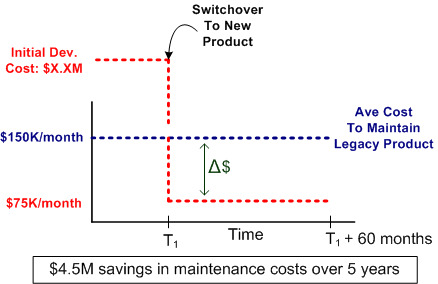
Now, assume that the picture below models where you want to be in a reasonable amount of time (not too “aggressive”) lest you kludge together a less maintainable beast than the old veteran you have now.

Cost and time-wise, the graph below shows your target date, T1, and your maintenance cost savings bogey, $75K per month. For the example below, if the development of the new product incarnation takes 2 years and $2.25 M, your savings will start accruing at 2.5 years after the “switchover” date T1.
Now comes the fun part of this essay. Assume that:
- Some other product development group in your company is 2 years into the development of a new middleware “candidate” that may or may not satisfy all of your top four prioritized goals (as listed in the second figure up the page).
- This new middleware layer is larger than your current middleware layer and complicated with many new (yet at the same time old) technologies with relatively steep learning curves.
- Even after two years of consumed resources, the middleware is (surprise!) poorly documented.
- Except for a handful of fragmented and scattered powerpoint files, programming and design artifacts are non-existent – showing a lack of empathy for those who would want to consider leveraging the 2 year company investment.
- The development process that the middleware team is using is fairly unstructured and unsupervised – as evidenced by the lack of project and technical documentation.
- Since they’re heavily invested in their baby, the members of the development team tend to get defensive when others attempt to probe into the depths of the middleware to determine if the solution is the right fit for your impending product upgrade.
How would you mitigate the risk that your maintenance costs would go up instead of down if you switched over to the new middleware solution? Would you take the middleware development team’s word for it? What if someone proposed prototyping and exploring an alternative solution that he/she thinks would better satisfy your product upgrade goals? In summary, how would you decrease the chance of making a costly mistake?
My OSEE Experience
Intro
A colleague at work recently pointed out the existence of the Eclipse org’s Open System Engineering Environment (OSEE) project to me. Since I love and use the Eclipse IDE regularly for C++ software development, I decided to explore what the project has to offer and what state it is in.
The OSEE is in the “incubation” stage of development, which means that it is not very mature and it may require a lot more work before it has a chance of being accepted by a critical mass of users. On the project’s main page, the following sentences briefly describe what the OSEE is:
The Open System Engineering Environment (OSEE) project provides a tightly integrated environment supporting lean principles across a product’s full life-cycle in the context of an overall systems engineering approach. The system captures project data into a common user-defined data model providing bidirectional traceability, project health reporting, status, and metrics which seamlessly combine to form a coherent, accurate view of a project in real-time.
The feature list is as follows:
- End-to-end traceability
- Variant configuration management
- Integrated workflows and processes
- A Comprehensive issue tracking system
- Deliverable document generation
- Real-time project tracking and reporting
- Validation and verification of mission software
I don’t know about you, but the OSEE sounds more like an integrated project management tool than a system engineering toolset that facilitates requirements development and system design. Promoting the product ambiguously may be intended to draw in both system engineers and program managers?
The OSEE is not a design-by-committee, fragmented quagmire, it’s a derivation of a real system engineering environment employed for many years by Boeing during the development of a military helicopter for the US government. Like IBM was to the Eclipse framework, Boeing is to the OSEE.
“Standardization without experience is abhorrent.” – Bjarne Stroustrup
Download, Install, Use
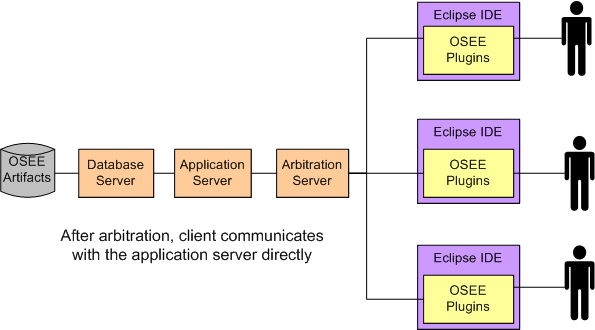
The figure below shows a simple model of the OSEE architecture. The first thing I did was download and install the (19) Eclipse OSEE plugins and I had no problem with that. Next, I tried to install and configure the required PostgresQL database and OSEE application and OSEE arbitration servers. After multiple frustrating tries, and several re-reads of the crappy install documentation, I said WTF! and gave up. I did however, open and explore various OSEE related Eclipse perspectives and views to try and get a better feel for what the product can do.
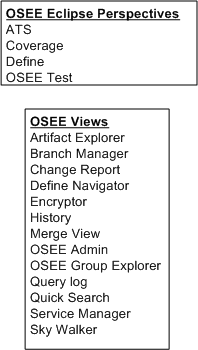
As shown in the figure below, the OSEE currently renders four user-selectable Eclipse perspectives and thirteen views. Of course, whenever I opened a perspective (or a view within a perspective) I was greeted with all kinds of errors because the OSEE back end kludge was not installed correctly. Thus, I couldn’t create or manipulate any hypothetical “system engineering” artifacts to store in the project database.
Conclusion
As you’ve probably deduced, I didn’t get much out of my experience of trying to play around with the OSEE. Since it’s still in the “incubation” stage of development and it’s free, I shouldn’t be too harsh on it. I may revisit it in the future, but after looking at the OSEE perspective/view names above and speculating about their purposes, I’ve pre-judged the OSEE to be a heavyweight bureaucrat’s dream and not really useful to a team of engineers. Bummer.
Get The Hell Out Of There!
When a highly esteemed project manager starts a project kickoff meeting with something like: “Our objective is to develop the cheapest product and get it out to the customer as quickly as possible to minimize the financial risk to the company“, and nobody in attendance (including you) bats an eyelash or points out the fact that the proposed approach conflicts with the company’s core values, my advice to you is to do as the title of this post says: “get the hell out of there (you spineless moe-foe)!”. Conjure up your communication skills and back out of the project – in a politically correct way, of course. If you get handcuffed into the job via externally imposed coercion or guilt inducing torture techniques (a.k.a corpo waterboarding), then, then, then……. good luck sucka! I’ll see you in hell.

The bitterness of poor system performance remains long after the sweetness of low prices and prompt delivery are forgotten. – Jerry Lim
Linear Culture, Iterative Culture
A Linear Think Technical Culture (LTTC) equates error with sin. Thus, iteration to remove errors and mistakes is “not allowed” and schedules don’t provide for slack time in between sprints to regroup, reflect and improve quality . In really bad LTTCs, errors and mistakes are covered up so that the “perpetrators” don’t get punished for being less than perfect. An Iterative Think Technical Culture (ITTC) embraces the reality that people make mistakes and encourages continuous error removal, especially on intellectually demanding tasks.
The figure below shows the first phase of a hypothetical two phase project and the relative schedule performance of the two contrasting cultures. Because of the lack of “Fix Errors” periods, the LTTC reaches the phase I handoff transition point earlier .

The next figure shows the schedule performance of phase II in our hypothetical project. The LTTC team gets a head start out of the gate but soon gets bogged down correcting fubars made during phase I. The ITTC team, having caught and fixed most of their turds much closer to the point in time at which they were made, finishes phase II before the LTTC team hands off their work to the phase III team (or the customer if phase II is that last activity in the project).

It appears that project teams with an ITTC always trump LTTC teams. However, if the project complexity, which is usually intimately tied to its size, is low enough, an LTTC team can outperform an ITTC team. The figure below illustrates a most-likely-immeasurable “critical project size” metric at which ITTC teams start outperforming LTTC teams.
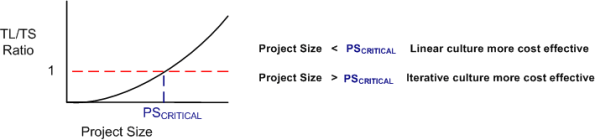
The mysterious critical-project-size metric can be highly variable between companies, and even between groups within a company. With highly trained, competent, and experienced people, an LTTC team can outperform an ITTC team at larger and larger critical project sizes. What kind of culture are you immersed in?
Percent Complete
In order to communicate progress to someone who requires a quantitative number attached to it, some sort of consistent metric of accomplishment is needed. The table below lists some of the commonly used size metrics in the software development world.
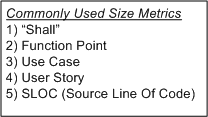
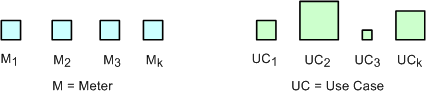
All of these metrics suffer to some extent from a “consistency” problem. The problem (as exemplified in the figure below) is that, unlike a standard metric such as the “meter”, the size and meaning of each unit is different from unit to unit within an application, and across applications. Out of all the metrics in the list, the definition of what comprises a “Function Point” unit seems to be the most rigorous, but it still suffers from a second, “translation” problem. The translation problem manifests when an analyst attempts to convert messy and ambiguous verbal/written user needs into neat and tidy requirement metrics using one of the units in the list.
Nevertheless, numerically-trained MBA and PMI certified managers and their higher up executive bosses still obsessively cling to progress reports based on these illusory metrics. These STSJs (Status Takers and Schedule Jockeys) love to waste corpo time passing around status reports built on quicksand like the “percent done” example below.

The problems with using graphs like this to “direct” a project are legion. First, it is assumed that the TNFP is known with high accuracy at t=0 and, more erroneously, that its value stays constant throughout the duration. A second problem with this “best practice” is that lots, if not all, non-trivial software development projects do not progress linearly with the passage of time. The green trace in the graph is an example of a non-linearly progressing project.
Since most managers are sequential, mechanistic, left-brain-trained thinkers, they falsely conclude that all projects progress linearly. These bozelteens also operate under the meta-assumption that no initial assumptions are violated during project execution (regardless of what items they initially deposited in their “risk register” at t=0). They mistakenly arrive at conclusions like: ” if it took you two weeks to get to 50% done, you will be expected to be done in two more weeks”. Bummer.
Even after trashing the “percent complete” earned-value-management method in the previous paragraphs, I think there is a chance to acquire a long term benefit by tracking progress this way. The benefit can accrue IF AND ONLY IF the method is not taken too seriously and it’s not used to impose undue stress upon the software creators and builders who are trying their best to balance time-cost and quality. Performing the “percent complete” method over a bunch of projects and averaging the results can yield decent, but never 100% accurate, metrics that can be used to more effectively estimate future project performance. What do you think?

Why am I here?
WTF?
Meh!
D'oh!

My BTC Address



 Bulldozer00's Blog