Archive
Well Architected
The UML component diagram below attempts to model the concept and characteristics of a well architected software-intensive system.

What other attributes of well architected/designed systems are there?
Without a sketched out blueprint like this, if you start designing and/or coding and cobbling together components randomly selected out of the blue and with no concept of layering/balancing, the chance that you end up will a well architected system is nil. You may get it “working” and have a nice GUI pasted on top of the beast, but under the covers it will be fragile and costly to extend/maintain/debug – unless a miracle has occurred.
If you or your management don’t know or care or are “allowed” to expose, capture, and continuously iterate on that architecture/design dwelling in your faulty and severely limited mind and memory, then you deserve what you get. Sadly, even though they don’t deserve it, every other stakeholder gets it too: your company, your customers, your fellow downstream maintainers, etc….
Well Known And Well Practiced
It’s always instructive to reflect on project failures so that the same costly mistakes don’t get repeated in the future. But because of ego-defense, it’s difficult to step back and semi-objectively analyze one’s own mistakes. Hell, it’s hard to even acknowledge them, let alone to reflect on, and to learn from them. Learning from one’s own mistake’s is effortful, and it often hurts. It’s much easier to glean knowledge and learning from the faux pas of others.
With that in mind, let’s look at one of the “others“: Hewlitt Packard. HP’s 2010 $1.2B purchase of Palm Inc. to seize control of its crown jewel WebOS mobile operating system turned out to be a huge technical and financial and social debacle. As chronicled in this New York Times article, “H.P.’s TouchPad, Some Say, Was Built on Flawed Software“, here are some of the reasons given (by a sampling of inside sources) for the biggest technology flop of 2011:
- The attempted productization of cutting edge, but immature (freeze ups, random reboots) and slooow technology (WebKit).
- Underestimation of the effort to fix the known technical problems with the OS.
- The failure to get 3rd party application developers (surrogate customers) excited about the OS.
- The failure to build a holistic platform infused with conceptual integrity (lack of a benevolent dictator or unapologetic aristocrat).
- The loss of talent in the acquisition and the imposition of the wrong people in the wrong positions.
Hmm, on second thought, maybe there is nothing much to learn here. These failure factors have been known and publicized for decades, yet they continue to be well practiced across the software-intensive systems industry.
Obviously, people don’t embark on ambitious software development projects in order to fail downstream. It’s just that even while performing continuous due diligence during the effort, it’s still extremely hard to detect these interdependent project killers until it’s too late to nip them in the bud. Adding salt to the wound, history has inarguably and repeatedly shown that in most orgs, those who actually do detect and report these types of problematiques are either ignored (the boy who cried wolf syndrome) or ostracized into submission (the threat of excommunication syndrome). Note that several sources in the HP article wanted to “remain anonymous“.

Related articles
- Sluggish code and HP power plays blamed for webOS’ failure (slashgear.com)
- Leaks: webOS struggled with poor staff, fundamental design (electronista.com)
- Why WebOS Failed (technologizer.com)
Graphics, Text, And Source Code
On the left, we have words of wisdom from Grady Booch and friends. On the right, we have sage advice hatched from the “gang of four“. So, who’s right?
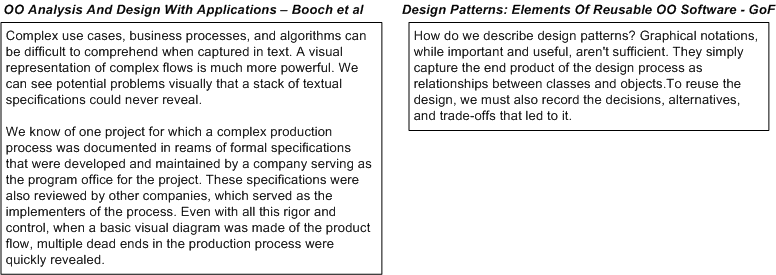
Why, both groups are “right“. If all you care about is “recording the design in source code“, then you’re “wrong“…

If you’re a software “anything” (e.g. architect, engineer, lead, manager, developer, programmer, analyst) and you haven’t read these two classics, then either read them or contemplate seeking out a new career.

But wait! All may not be lost. If you think object orientation is obsolete and functional programming is the way of the future, then forget (almost) everything that was presented in this post.
What Would You Do?
Assume that you’re working on a software system comprised of a set of core and peripheral application components. Also assume that these components rest on top of a layered set of common system libraries.
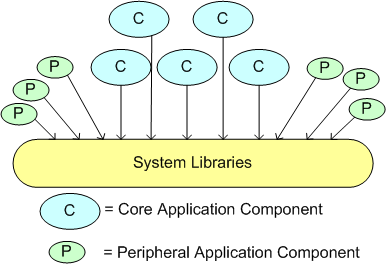
Next, assume that you remove some functionality from a system library that you thought none of the app components are using. Finally, assume that your change broke multiple peripheral apps, and, after finding out, the apps writer asked you nicely to please restore the functionality.
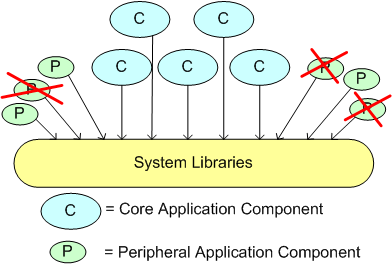
What would you do?
Capers And Salmon
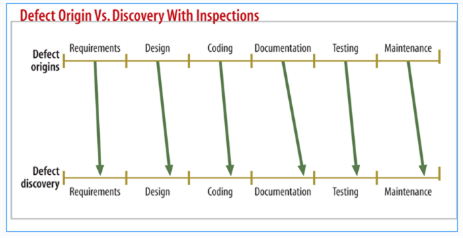
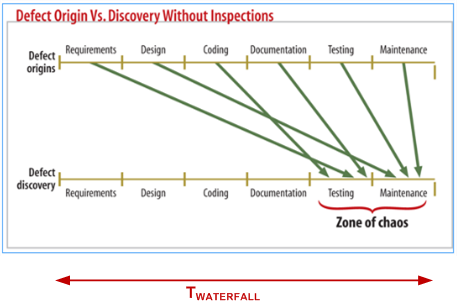
I like capers with my salmon. In general, I also like the work of long time software quality guru Capers Jones. In this Dr. Dobb’s article, “Do You Inspect?”, the caped one extols the virtues of formal inspection. He (rightly) states that formal, Fagan type, inspections can catch defects early in the product development process – before they bury and camouflage themselves deep inside the product until they spring forth way downstream in the customer’s hands. (I hate when that happens!)
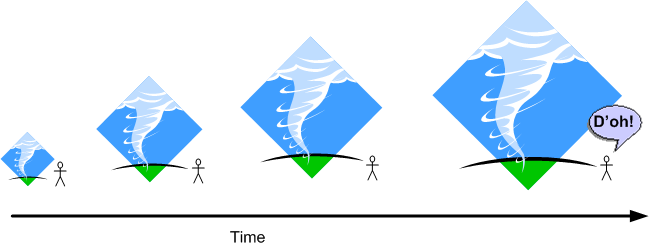
The pair of figures below (snipped from the article) graphically show what Capers means. Note that the timeline implies a long, sequential, one-shot, waterfall development process (D’oh!).
That’s all well and dandy, but as usual with mechanistic, waterfall-oriented thinking, the human aspects of doing formal inspections “wrong” aren’t addressed. Because formal inspections are labor-intensive (read as costly), doing artifact and code inspections “wrong” causes internal team strife, late delivery, and unnecessary budget drain. (I hate when that happens!)
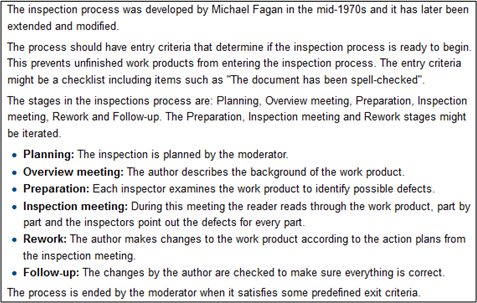
An agile-oriented alternative to boring and morale busting “Fagan-inspections-done-wrong” is shown below. The short, incremental delivery time frames get the product into the hands of internal and external non-developers early and often. As the system grows in functionality and value, users and independent testers can bang on the system, acquire knowledge/experience/insight, and expose bugs before they intertwine themselves deep into the organs of the product. Working hands-on with a product is more exhilarating and motivating than paging through documents and power points in zombie or contentious meetings, no?

Of course, it doesn’t have to be all or nothing. A hybrid approach can be embraced: “targeted, lightweight inspections plus incremental deliveries with hands-on usage”.
PPPP Invention
In “Engineering A Safer World“, Nancy Leveson uses the autopilot example below to illustrate the extra step of complexity that was introduced into the product development process with the integration of computers and software into electro-mechanical system designs.
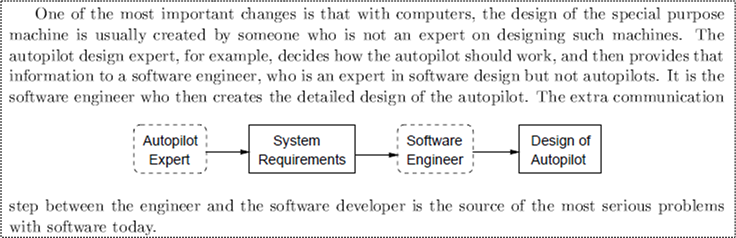
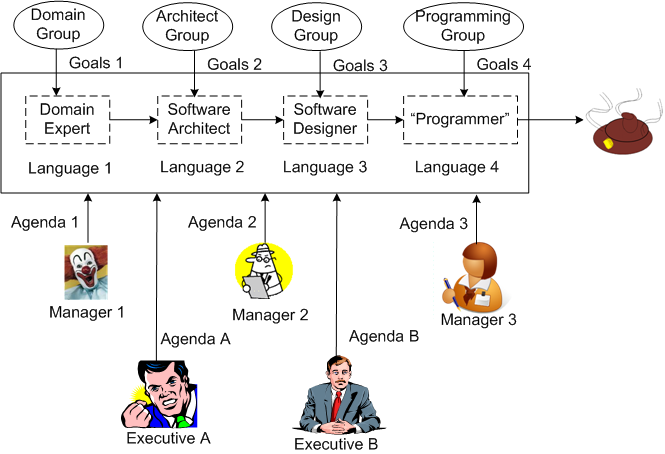
In the worst case, as illustrated below, the inter-role communication problem can be exacerbated. Although the “gap of misunderstanding” from language mismatch is always greatest between the Domain Expert and the Software Architect, as more roles get added to the project, more errors/defects are injected into the process.

But wait! It can get worse, or should I say, “more challenging“. Each person in the chain of cacophony can be a member of a potentially different group with conflicting goals.

But wait, it can get worser! By consciously or unconsciously adding multiple managers and executives to the mix, you can put the finishing touch on your very own Proprietary Poop Producing Process (PPPP).
So, how can you try to inhibit inventing your very own PPPP? Two techniques come to mind:
- Frequent, sustained, proactive, inter-language education (to close the gaps of misunderstanding).
- Minimization of the number of meddling managers (and especially, pseudo-manager wannabes) allowed anywhere near the project.
Got any other ideas?
Useless Code

Conscious Degradation Of Style
One (of many) of my pet peeves can be called “Conscious Degradation Of Style” (CDOS). CDOS is what happens when a programmer purposely disregards the style in an existing code base while making changes/additions to it. It’s even more annoying when the style mismatch is pointed out to the perpetrator and he/she continues to pee all over the code to mark his/her territory. Sheesh.

When I have to make “local” changes to an existing code base, if I can discern some kind of consistent style within the code (which may be a challenge in itself!), I consciously and mightily try to preserve that style when I make the changes – no matter how much my ego may “disagree” with the naming, formatting, idiomatic, and implementation patterns in the code. That freakin’ makes (dollars and) sense, no?
What about you, what do you do?
Attack And Advance
Check out this recent Grady Booch tweet on the topic of “why” he, James Rumbaugh, and Ivar Jacobson syntegrated their individual modeling technologies into what became the UML standard:

Over 20+ years ago, when the rate of global change was just a mere inkling of what it is today, my friend Bill Livingston stated in HFAW that: “complexity has a bright future“. He was right on the money and I admire people like Bill and the three UML amigos for attacking complexity (a.k.a ambiguity) head-on – especially when lots of people seem to love doing the exact opposite – piling complexity on top of complexity.
Extreme complexity may not be vanquishable, but (I think) it can be made manageable with the application of abstract “systems thinking” styles and concrete tools/techniques/processes created by smart and passionate people, no?
James YAGNI
In the software world, YAGNI is one of many cutely named heuristics from the agile community that stands for “don’t waste time/money putting that feature/functionality in the code base NOW cuz odds are that You Ain’t Gonna Need It!”. It’s good advice, but it’s often violated innocently, or when the programmer doesn’t agree with the YAGNI admonisher for legitimate or “political” reasons.
When a team finds out downstream and (more importantly) admits that there’s lots of stuff in the code base that can be removed because of YAGNI violations, there are two options to choose from:
- Spend the time/money and incur the risk of breakage by extricating and removing the YAGNI features
- Leave the unused code in there to save time/money and eschew making the code base slimmer and, thus, easier to maintain.
It’s not often perfectly clear what option should be taken, but BD00 speculates (he always speculates) that the second option is selected way more often than the first. What’s your opinion?


Why am I here?
WTF?
Meh!
D'oh!

My BTC Address



 Bulldozer00's Blog