Archive
My “Status” As Of 09-27-09
I recently finished a 2 month effort discovering, developing, and recording a state machine algorithm that produces a stream of integrated output “target” reports from a continuous stream of discrete, raw input message fragments. It’s not rocket science, but because of the complexity of the algorithm (the devil’s always in the details), a decision was made to emulate this proprietary algorithm in multiple, simulated external environmental scenarios. The purpose of the emulation-plus-simulation project is to work out the (inevitable) kinks in the algorithm design prior to integrating the logic into an existing product and foisting it on unsuspecting customers :^) .
The “bent” SysML diagram below shows the major “blocks” in the simulator design. Since there are no custom hardware components in the system, except for the scenario configuration file, every SysML block represents a software “class”.
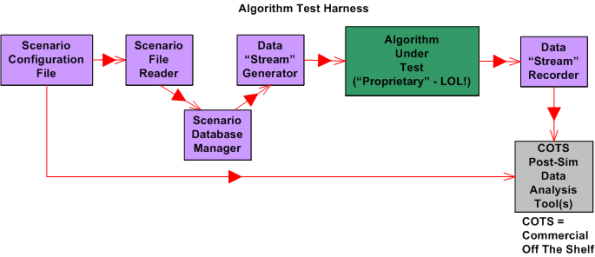
Upon launch, the simulator:
- Reads in a simple, flat, ASCII scenario configuration file that specifies the attributes of targets operating in the simulated external environment. Each attribute is defined in terms of a <name=value> token pair.
- Generates a simulated stream of multiplexed input messages emitted by the target constellation.
- Demultiplexes and processes the input stream in accordance with the state machine algorithm specification to formulate output target reports.
- Records the algorithm output target report stream for post-simulation analysis via Commercial Off The Shelf (COTS) tools like Excel and MATLAB.
I’m currently in the process of writing the C++ code for all of the components except the COTS tools, of course. On Friday, I finished writing, unit testing, and integration testing the “Simulation Initialization” functionality (use case?) of the simulator.Yahoo!
The diagram below zooms in on the front end of the simulator that I’ve finished (100% of course) developing; the “Scenario File Reader” class, and the portion of the in-memory “Scenario Database Manager” class that stores the scenario configuration data in the two sub-databases.

The next step in my evil plan (moo ha ha!) is to code up, test, and integrate the much-more-interesting “Data Stream Generator” class into the simulator without breaking any of the crappy code that has already been written. 🙂
If someone (anyone?) actually reads this boring blog and is interested in following my progress until the project gets finished or canceled, then give me a shoutout. I might post another status update when I get the “Data Stream Generator” class coded, tested, and integrated.
What’s your current status?
Architectural, Mechanistic, And Detailed
Bruce Powel Douglass is one of my favorite embedded systems development mentors. One of his ideas is to categorize the activity of design into three levels of increasingly detailed abstraction:
- Architectural (5 views)
- Mechanistic
- Detailed
The SysML figure below tries to depict the conceptual differences between these levels. (Even if you don’t know the SysML, can you at least viscerally understand the essence of what the drawings are attempting to communicate?)

Since the size, algorithmic density, and safety critical nature of the software intensive systems that I’ve helped to develop require what the agile community mocks as BDUF (Big Design Up Front), I’ve always communicated my “BDUF” designs in terms of the first and third abstractions. Thus, the mechanistic design category is sort of new to me. I like this category because it shortens the gulf of understanding between the architectural and the detailed design levels of abstraction. According to Mr. Douglass, “mechanistic design” is the act of optimizing a system at the level of an individual collaboration ( a set of UML classes or SysML blocks working closely together to realize a single use case). From now on, I’m gonna follow his three tier taxonomy in communicating future designs, but only when it’s warranted, of course (I’m not a religious zealot for or against any method), .
BTW, if you don’t do BDUF, you might get CUDO (Crappy and Unmaintanable Design Out back). Notice that I said “might” and not “will”.
Software Developer Revolt!
As the size and complexity of the software-intensive systems that we need to develop increase, a corresponding rise in the level of abstraction of the programming languages used to build them has understandably increased. From routines to functions, to objects, to namespaces, the progression in abstract text-based language encapsulation mechanisms is depicted in the figure below. Will the transition from text-based languages to graphics-based languages infiltrate the mainstream soon? Isn’t it inevitable that graphical languages, and the tools that enable their use, will push the art of hand-coding via text languages into the dust bin of irrelevance?
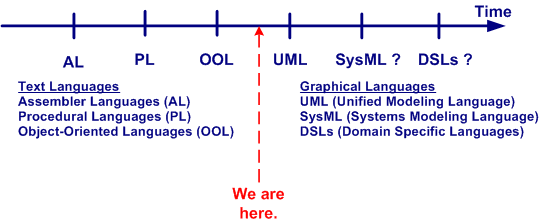
In his book Real-Time Agility: The Harmony/ESW Method For Real-Time And Embedded Systems Development, Bruce Powel Douglass unabashedly says “YES!”. His agile methodology (yes, yet another “agile” methodology is foisted upon us) doesn’t even require a “coding” phase/activity.
The figure below attempts to contrast the mainstream CDD (Code Driven Development) approach of today with an MDD (Model Driven Development) approach like Mr. Douglass’s. Will the transition from one dimensional text-based languages to more abstract, two dimensional graphics-based languages be too much of a leap for today’s programmers? Compared with text-to-text language transitions, a text-to-graphics language jump is more akin to a disruptive quantum leap. Will software developers ironically morph into Luddites, fighting this technological change tooth and nail? Is the UML today’s graphical incarnation of the text-based assembler language of yesterday? Will tools like IBM’s Rhapsody and Artisan’s Studio supplant the myriad of compiler-linker toolchains of today? What say you?

UML and SysML Behavior Modeling
Most interesting systems exhibit intentionally (and sometimes unintentionally) rich behavior. In order to capture complex behavior, both the UML and its SysML derivative provide a variety of diagrams to choose from. As the table below shows, the UML defines 7 behavior diagram types and the SysML provides a subset of 4 of those 7.
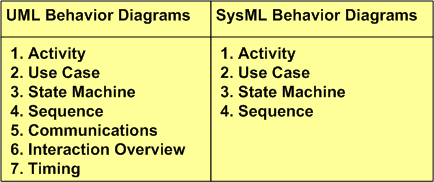
Activity diagrams are a richer, more expressive enhancement to the classic, stateless, flowchart. Use case diagrams capture a graphical view of high level, text-based functional requirements. State machine diagrams are used to model behaviors that are a function of current inputs and past history. Sequence diagrams highlight the role of “time” in the protocol interactions between SysML blocks or UML objects.
What’s intriguing to me is why the SysML didn’t include the Timing diagram in its behavioral set of diagrams. The timing diagram emphasizes the role of time in a different and more precise way than the sequence diagram. Although one can express precise, quantitative timing constraints on a sequence diagram, mixing timing precision with protocol rules can make the diagram much more complicated to readers than dividing the concerns between a sequence diagram and timing diagram pair. Exclusion of the timing diagram is even more mysterious to me because timing constraints are very important in the design of hard/soft real-time systems. Incorrect timing behavior in a system can cause at least as much financial or safety loss as the production of incorrect logical outputs. Maybe the OMG and INCOSE will reconsider their decision to exclude the timing diagramin their next SysML revision?
Bend It Like Fowler
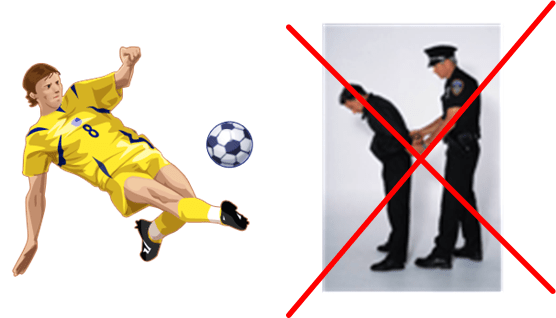
Remember the popular soccer movie “Bend It Like Beckham“? Well, I like to “Bend it like Fowler”. Martin Fowler, that is. In his terrific book “UML Distilled“, Martin recommends bending the UML when you need to communicate some application-specific design information and you’re not a UML language lawyer. Rather than leaving an important snippet of information out of your model because you don’t know how to capture it via a language formality, do whatever it takes to record it. It’s the stuff that falls through the cracks which causes downstream schedule delays and rework.
As a survivor of the structured analysis CASE (Computer-Aided Software Engineering) tools fad of the 80s, I’m leery of the expensive automated UML and SysML tools on the market today (Telelogic‘s Rhapsody and Artisan Studio come to mind). I think that both the UML and SysML are great languages for communicating a shared understanding of analysis and design information across a diverse team, but unlike general vector-based drawing tools (e.g. Microsoft Visio), language-specific tools are “handcuffers“. They usually require you to be a language lawyer and they force you to be syntactically and semantically correct or else your model won’t “compile“. Being goaded by a piece of software into spending a ton of time looking up and learning some obscure and arcane language detail when you’re under schedule pressure to produce output is not kool. I think that’s the reason why the 80s CASE tool push failed, and it may be why the UML/SysML tools won’t take hold (without coercion) in the mainstream now.
Disclaimer: I’ve dabbled with, but haven’t actually used one of the big, formal UML/SysML tools on a “real” project, so I’m just pulling this stuff out of you-know-where. Thus, don’t believe a word I say 🙂 .
The Venerable Context Diagram
Since the method was developed before object-oriented analysis, I was weaned on structured analysis for system development. One of the structured analysis tools that I found most useful was (and still is) the context diagram. Developing a context diagram is the first step at bounding a problem and clearly delineating what is my responsibility and what isn’t. A context diagram publicly and visibly communicates what needs to be developed and what merely needs to be “connected to” – what’s external and what’s internal.
After learning how to apply object-oriented analysis, I was surprised and dismayed to discover that the context diagram was not included in the UML (or even more surprisingly, the SysML) as one of its explicitly defined diagrams. It’s been replaced by the Use Case Diagram. However, after reading Tim Weilkiens’s Systems Engineering With SysML/UML: Modeling, Analysis, Design, I think that he solved the exclusion mystery.
….it wasn’t really fitting for a purely object-oriented notation like UML to support techniques from the procedural world. Fortunately the times when the procedural world and the object-oriented world were enemies and excluded each other are mostly overcome. Today, proven techniques from the procedural world are not rejected in object orientation, but further developed and integrated in the paradigm.
Isn’t it funny how the exclusive “either or” mindset dominates the inclusive “both and” mindset in the engineering world? When a new method or tool or language comes along, the older method gets totally rejected. The baby gets thrown out with the bathwater as a result of ego and dualistic “good-bad” thinking.
“Nothing is good or bad, thinking makes it so.” – William Shakespeare

Government Business
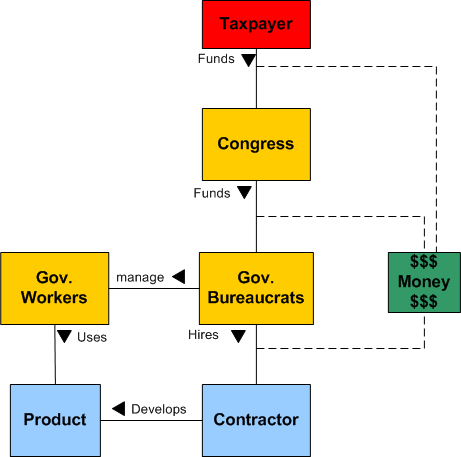
The figure below is a UML (Unified Modeling Language) class diagram that models a fictional government contracting system. So you don’t know UML? Don’t leave, because UML is easy to understand if one doesn’t over-specify in an attempt to show the world how “smart” he/she is.
The diagram shows the players (“classes” in UML lingo) in the game and some of the relationships (“associations” in UML lingo) between them. The diagram can be understood as follows:
The taxpayer funds congress, which funds groups of government bureaucrats, who hire a contractor to develop and deliver a product to be used by government workers to do their job of serving the public. Money, which everyone worships of course, ties all these main power players together. The contractor develops a product, which is then (delivered to the government and is) used by the government workers. All is well and the world becomes a better place. Whoopeee!
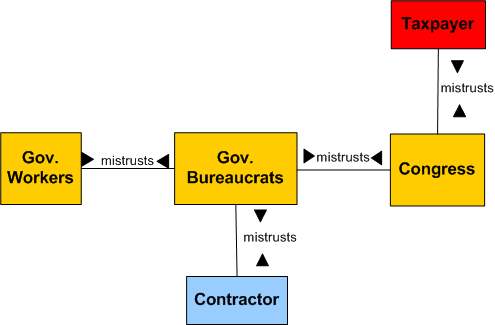
Yawn, meh. Boring and uninteresting, no? But wait, there’s more. Some hidden relationships between the “classes” in the system are not displayed by this proper and politically correct diagram. The diagram below shows just one of these hidden relationships – mistrust – between everyone 🙂 . How did this mistrust emerge and infiltrate the system? From the players getting burned in the past, that’s how. Especially the ultimate source of all money in the system – the taxpayer.
The last figure in this post shows the dynamic behaviors exhibited by each of the active players in this goverment business dance. In the UML, the middle compartment in a “class” (which is nothing more than a type of object – a classification) is intended to hold the attributes that characterize the class. I purposefully left them out because they’re not important to the message I’m trying to communicate.
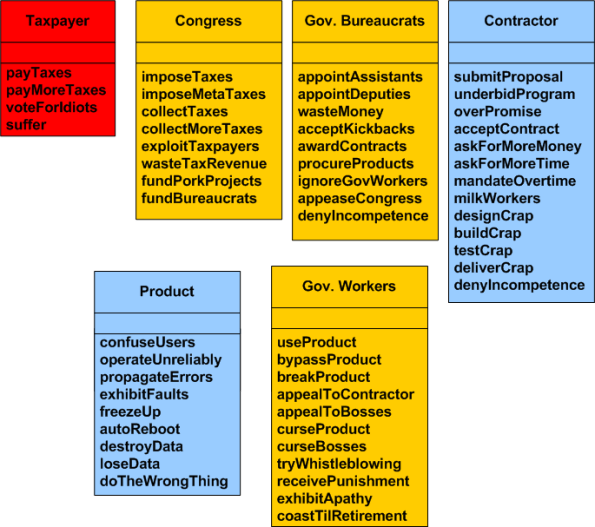
I’ll leave it to your imagination to create specific scenarios of system operation (called “use cases” in the UML). Scenarios are specific subsets of behaviors that are sequentially strung together in time (scenarios can be modeled with UML “sequence diagrams”). At the end of a given scenario execution, the system has achieved a specific goal, like “make everyone in the system miserable”, or “damage the environment”, or “reward those who deserve it the least and punish those who are innocent of wrongdoing”.
Are there any significant players missing in this system? Are there any relationships missing? Are there any behaviors missing? Got a different model of how this government system works or how it should work? Remember this:
The purpose of a system is what it does, not what its advocates say it does.
Thanks for listening!
The UML And The SysML
Introduction
The Unified Modeling Language (UML) and System Modeling Language (SysML) are two industry standard tools (not methodologies) that are used to visually express and communicate system structure and behavior.
The UML was designed by SW-weenies for SW-weenies. Miraculously, three well-known SW methodologists (affectionately called the three amigos) came together in koom-bah-yah fashion and synthesized the UML from their own separate pet modeling notations. Just as surprising is the fact that the three amigos subsequently donated their UML work to the Object Management Group (OMG) for standardization and evolution. Unlike other OMG technologies that were designed by large committees of politicians, the UML was originally created by three well-meaning and dedicated people.
After “seeing the light” and recognizing the power of the UML for specifying/designing large, complex, software-electro-mechanical systems, the system engineering community embraced the UML. But they found some features lacking or missing altogether. Thus, the SysML was born. Being smart enough not to throw the baby out with the bathwater, the system engineering powers-that-be modified and extended the UML in order to create the SysML. The hope was that broad, across-the-board adoption of the SysML-UML toolset pair would enable companies to more efficiently develop large complex multi-technology products.
The MLs are graphics intensive and the “diagram” is the fundamental building block of them both. The most widely used graphics primitives are simple enough to use for quick whiteboard sketching, but they’re also defined rigorously enough (hundreds of pages of detailed OMG specifications) to be “compiled” and checked for syntax and semantic errors – if required and wanted.
The Diagrams
The stacked UML class diagram below shows the structural relationships among the diagrams in the UML and SysML, respectively. The subsequent table lists all the diagrams in the two MLs and it also maps which diagram belongs to which ML.
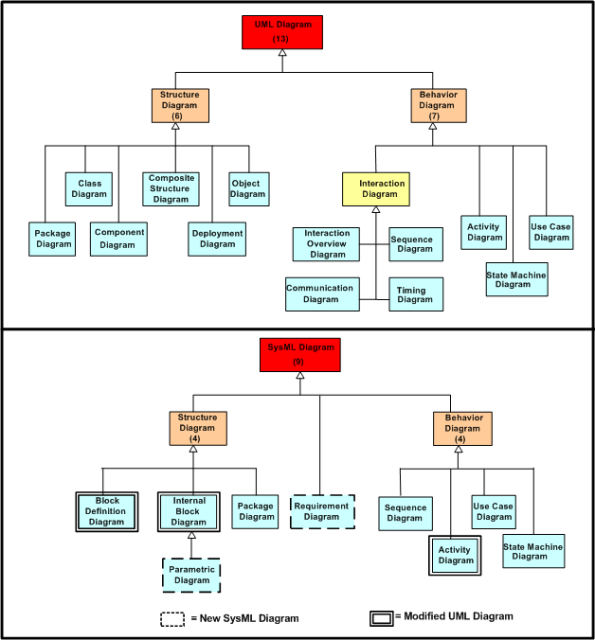
In the table, the blue, orange and green marked diagrams are closely related but not equal. For instance, the SysML block definition diagram is equivalent too, but replaces the UML class diagram.

Diagrams are created by placing graphics primitives onto a paper or electronic canvas and connecting entities together with associations. Text is also used in the construction of ML diagrams but it plays second fiddle to graphics. Both MLs have subsets of diagrams designed to clearly communicate the required structure(s) of a system and the required behavior(s) of the system.
The main individual star performers in the UML and the SysML are the “class” and (the more generic) “block”, respectively. Closely coupled class or block clusters can be aggregated and abstracted “upwards” into components, packages, and sub-systems, or they can be de-abstracted downwards into sub-classes, parts, and atomic types. A rich palette of line-based connectors can be employed to model various types of static and dynamic associations and relationships between classes and blocks.
A conundrum?
In the pre-ML days of large system specification and design, ad-hoc text and structured analysis/design tools were predominantly used to communicate requirements, architectures, and designs between engineering disciplines. The use of these ad-hoc tools often created large gaps in understanding between the engineering disciplines, especially between systems and software engineers. These misunderstandings led to inefficient and error prone development. The figure below shows how the SysML and UML toolset pair is intended to close this “gap of misunderstanding”.
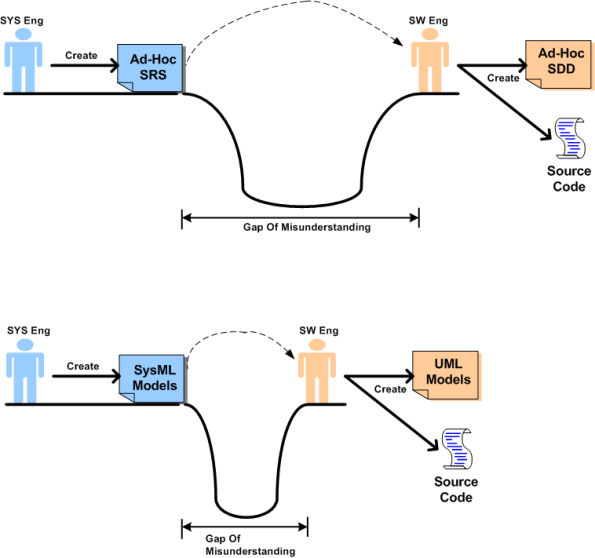
Minimization of the gap-of-misunderstanding leads to shorter *and* higher quality product development projects. Since the languages are large and feature rich, learning to apply the MLs effectively is not a trivial endeavor. You can’t absorb all the details and learn it overnight.
Cheapskate organizations who trivialize the learning process and don’t invest in their frontline engineering employees will get what they deserve if they mandate ML usage but don’t pay for extensive institution-wide training. Instead of closing the gap-of-misunderstanding, the gap may get larger if the MLs aren’t applied effectively. One could end up with lots of indecipherable documentation that slows development and makes maintenance more of a nightmare than if the MLs were not used at all (the cure is worse than the disease!). Just because plenty of documentation gets created, and it looks pretty, doesn’t guarantee that the initial product development and subsequent maintenance processes will occur seamlessly. Also, as always in any complex product development, good foundational technical documentation cannot replace the value and importance of face-to-face interaction. Having a minimal, but necessary and sufficient document set augments and supplements the efficient exchange of face-to-face tacit communication.
Closing Note: The “gap-of-misunderstanding” is a derivative of W. L. Livingston’s “gulf-of-human-intellect” (GOHI) which can be explored in Livingston’s book “Have Fun At Work”.
Committees
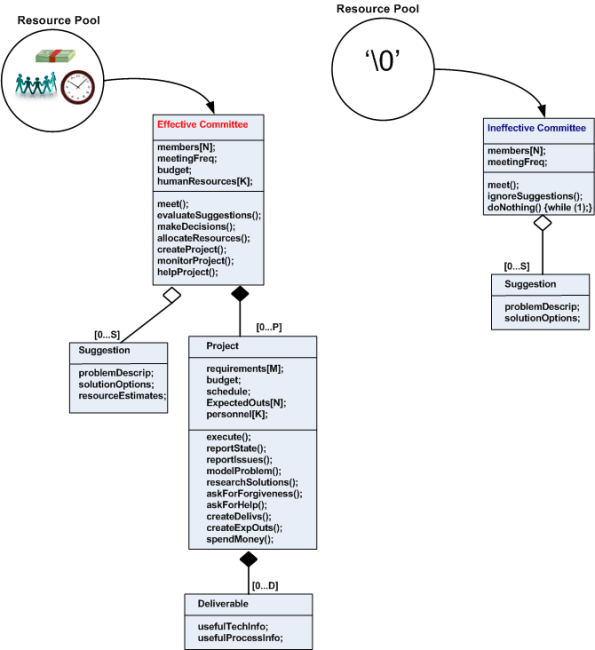
The figure below depicts a “bent” UML class diagram of two types of committees. For those who don’t know UML, I hope that the diagram is sort of self-explanatory.
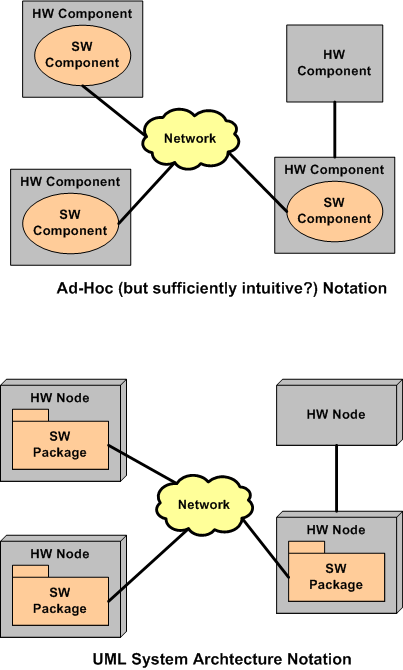
System Architecture Notation
For years and years, I’ve used the simple circle and square notation shown in the top half of the figure below in order to communicate (mostly to myself) multi-technology system designs. I did it because UML hadn’t been invented yet, and circles/squares were trivial to draw with any software drawing tool.
Now that UML has been out for quite a while, I’m gonna (try) and switch to the UML notation shown in the bottom half of the diagram. Even though packages and nodes are slightly harder to draw than circles and squares with most mainstream drawing tools, every UML tool makes it as easy as pie. Even Visio (my favorite engineering graphics tool) has templates for easily generating UML notation.

Why am I here?
WTF?
Meh!
D'oh!

My BTC Address



 Bulldozer00's Blog