Archive
What The Hell’s A Unit?
- CSCI = Computer Software Configuration Item
- CSC = Computer Software Component
- CSU = Computer Software Unit
In my industry (aerospace and defense), we use the abstract, programming-language-independent terms CSCI, CSC, and CSU as a means for organizing and conversing about software architectures and designs. The terms go way back, and I think (but am not sure) that someone in the Department Of Defense originally conjured them up.
The SysML diagram below models the semantic relationships between these “formal” terms. An application “contains” one or more CSCIs, each of which which contains one or more CSCs, each of which contains one or more CSUs. If we wanted to go one level higher, we could say that a “system” contains one or more Applications.
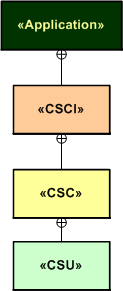
In my experience, the CSCI-CSC-CSU tree is almost never defined and recorded for downstream reference at project start. Nor is it evolved or built-up as the project progresses. The lack of explicit definition of the CSCs and, especially the CSUs, has often been a continuous source of ambiguity, confusion, and mis-communication within and between product development teams.
“The biggest problem in communication is the illusion that it has taken place.” – George Bernard Shaw.
A consequence of not classifying an application down to the CSU level is the classic “what the hell’s a unit?” problem. If your system is defined as just a collection of CSCIs comprised of hundreds of thousands of lines of source code and the identification of CSCs and CSUs is left to chance, then a whole CSCI can be literally considered a “unit” and you only have one unit test per CSCI to run (LOL!)
In preparation for an idea that follows, check out the language-specific taxonomies that I made up (I like to make stuff up so people can rip it to shreds) for complex C++ and Java applications below. If your app is comprised of a single, simple process without any threads or tasks (like they teach in school and intro-programming books), mentally remove the process and thread levels from the diagram. Then just plop the Application level right on top of the C++ namespace and/or the Java package levels.

To solve, or at least ameliorate the “what the hell’s a unit?” problem, I gently propose the consideration of the following concrete-to-abstract mappings for programs written in C++ and Java. In both languages, each process in an application “is a” CSCI and each thread within a process “is a” CSC. A CSU “is a” namespace (in C++) or a package (in Java).
I think that adopting a map such as this to use as a standard communication tool would lead to fewer mis-communications between and among development team members and, more importantly, between developer orgs and customer orgs that require design artifacts to employ the CSCI/CSC/CSU terminology.


As just stated, the BD00 proposal maps a C++ namespace or a java package into the lowest level element of abstract organization – the CSU. If that level of granularity is too coarse, then a class, or even a class member function (method in Java), can be designated as a CSU (as shown below). The point is that each company’s software development organization should pick one definition and use it consistently on all their projects. Then everyone would have a chance of speaking a common language and no one would be asking, “what the hell’s a freakin’ unit?“.

So, “What the hell’s a unit?” in your org? A member function? A class? A namespace? A thread? A process? An application? A system?
Useless Cases
Despite the blasphemous title of this blarticle, I think that “use cases” are a terrific tool for capturing a system’s functional requirements out of the ether; for the right class of applications. Nevertheless, I agree with requirements “expert” Karl Wiegers, who states the following in “More About Software Requirements: Thorny Issues And Practical Advice“:
However, use cases are less valuable for projects involving data warehouses, batch processes, hardware products with embedded control software, and computationally intensive applications. In these sorts of systems, the deep complexity doesn’t lie in the user-system interactions. It might be worthwhile to identify use cases for such a product, but use case analysis will fall short as a technique for defining all the system’s behavior.
I help to define, specify, design, code, and test embedded (but relatively “big”) software-intensive sensor systems for the people-transportation industry. The figure below shows a generic, pseudo-UML diagram of one of these systems. Every component in the string is software-intensive. In this class of systems, like Karl says, “the deep complexity doesn’t lie in the user-system interactions”. As you can see, there’s a lot of special and magical “stuff” going on behind the GUI that the user doesn’t know about, and doesn’t care to know about. He/she just cares that the objects he/she wants to monitor show up on the screen and that the surveillance picture dutifully provided by the system is an accurate representation of what’s going on in the real world outside.
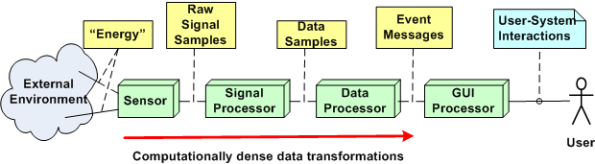
A list of typical functions for a product in this class may look like this:
- Display targets
- Configure system
- Monitor system operation
- Tag target
- Control system operation
- Perform RF signal filtering
- Perform signal demodulation
- Perform signal detection
- Perform false signal (e.g. noise) rejection
- Perform bit detection, extraction, and message generation
- Perform signal attribute (e.g. position, velocity) estimation
- Perform attribute tracking
Notice that only the top five functions involve direct user interaction with the product. Thus, I think that employing use cases to capture the functions required to provide those capabilities is a good idea. All the dirty and nasty”perform” stuff requires vertical, deep mathematical expertise and specification by sensor domain experts (some of whom, being “expert specialists”, think they are Gods). Thus, I think that the classical “old and unglamorous” Software Requirements Specification (SRS) method of defining the inputs/processing/output sequences (via UML activity diagrams and state machine diagrams) blows written use case descriptions out of the water in terms of Return On Investment (ROI) and value transferred to software developers.
Clueless Bozo Managers (BMs) and senior wannabe-a-BM developers who jump on the “use cases for everything” bandwagon (but may have never written a single use case description themselves) waste company time and money trying to bully “others” into ramming a square peg into a round hole. But they look hip, on the ball, and up to date doing it. And of course, they call it leadership.
Working Software, Working Documents
Documentation is a love letter that you write to your future self – Damian Conway
The agile software development community rightly says that the best measure of progress is demonstrate-able working software that is delivered incrementally and frequently to customers for their viewing and using pleasure. For the most part, and for good reasons based on historical evidence, agile proponents eschew documentation. Nevertheless, big bureaucratic customers like national and state governments often, very often, require and expect comprehensive documentation from their vendors. Thus, zealot agilist juntas essentially ignore the requirements of a large and deep-pocketed customer base.
It’s software development, not documentation development – Scott Ambler
What if we can bring big, stodgy, conservative, and sometimes-paranoid customers halfway? Why not try to convince them of the merits of delivering frequent and incrementally improving requirements, design, construction, and user documents along with the working software builds? If we pay as we go, incrementally doing a little documentation, doing a little software coding, and doing a little testing instead of piling on the documentation up front or frantically kludging the documents together after the fact, wouldn’t the end result would turn out better?
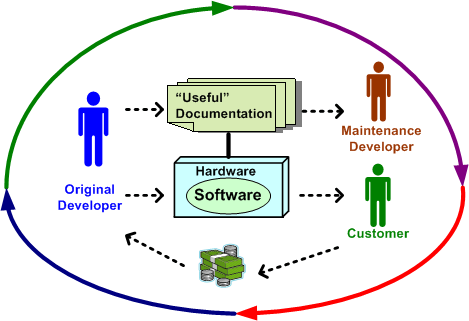
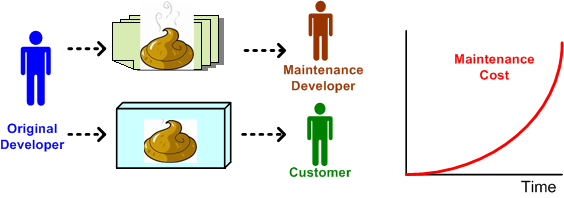
A consequence of generating crappy documentation for big, long-lived systems is the high cost of downstream maintenance. Dumping hundreds of thousands of lines of code onto the maintenance team without handing them synchronized blueprints is an irresponsible act of disrespect to both the team and the company. Without being able to see the forest for the trees, maintenance teams, which are usually comprised of young and impressionable developers, get frustrated and inject kludged up implementations of new features and bug fixes into the product. Bad habits are formed, new product versions get delivered later and later, and maintenance costs grow higher and higher. Bummer.
Scaleability
The other day, a friend suggested plotting “functionality versus size” as a potentially meaningful and actionable measure of software development process prowess. The figure below is an unscientific attempt to generically expand on his idea.

Assume that the graph represents the efficiency of three different and unknown companies (note: since I don’t know squat and I am known for “making stuff up”, take the implications of the graph with a grain of salt). Because it’s well known by industry experts that the complexity of a software-intensive product increases at a much faster rate than size, one would expect the “law of diminishing returns” to kick in at some point. Now, assume that the inflection point where the law snaps into action is represented by the intersection of the three traces in the graph. The red company’s performance clearly shows the deterioration in efficiency due to the law kicking in. However, the other two companies seem to be defying the law.
How can a supposedly natural law, which is unsentimental and totally indifferent to those under its influence, be violated? In a word, it’s “scaleability“. The purple and green companies have developed the practices, skills, and abilities to continuously improve their software development processes in order to keep up with the difficulty of creating larger and more complex products. Unlike the red company, their processes are minimal and flexible so that they can be easily changed as bigger and bigger products are built.
Either quantitatively or qualitatively, all growing companies that employ unscaleable development processes eventually detect that they’ve crossed the inflection point – after the fact. Most of these post-crossing discoverers panic and do the exact opposite of what they need to do to make their processes scaleable. They pile on more practices, procedures, forms-for-approval, status meetings, and oversight (a.k.a. managers) in a misguided attempt to reverse deteriorating performance. These ironic “process improvement” actions solidify and instill rigidity into the process. They handcuff and demoralize development teams at best, and trigger a second inflection point at worst:
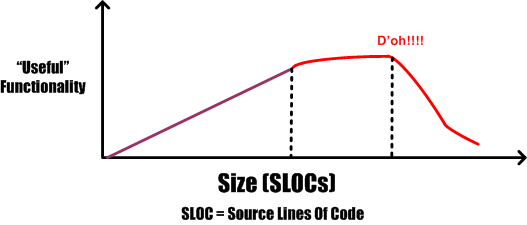
More meetings plus more documentation plus more management does not equal more success. – NASA SEL
Is your process scaleable? If so, what specific attributes make it scaleable? If not, are the results that you’re getting crying out for scaleability?
Percent Complete
In order to communicate progress to someone who requires a quantitative number attached to it, some sort of consistent metric of accomplishment is needed. The table below lists some of the commonly used size metrics in the software development world.
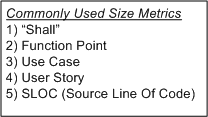
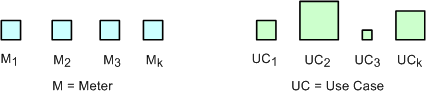
All of these metrics suffer to some extent from a “consistency” problem. The problem (as exemplified in the figure below) is that, unlike a standard metric such as the “meter”, the size and meaning of each unit is different from unit to unit within an application, and across applications. Out of all the metrics in the list, the definition of what comprises a “Function Point” unit seems to be the most rigorous, but it still suffers from a second, “translation” problem. The translation problem manifests when an analyst attempts to convert messy and ambiguous verbal/written user needs into neat and tidy requirement metrics using one of the units in the list.
Nevertheless, numerically-trained MBA and PMI certified managers and their higher up executive bosses still obsessively cling to progress reports based on these illusory metrics. These STSJs (Status Takers and Schedule Jockeys) love to waste corpo time passing around status reports built on quicksand like the “percent done” example below.

The problems with using graphs like this to “direct” a project are legion. First, it is assumed that the TNFP is known with high accuracy at t=0 and, more erroneously, that its value stays constant throughout the duration. A second problem with this “best practice” is that lots, if not all, non-trivial software development projects do not progress linearly with the passage of time. The green trace in the graph is an example of a non-linearly progressing project.
Since most managers are sequential, mechanistic, left-brain-trained thinkers, they falsely conclude that all projects progress linearly. These bozelteens also operate under the meta-assumption that no initial assumptions are violated during project execution (regardless of what items they initially deposited in their “risk register” at t=0). They mistakenly arrive at conclusions like: ” if it took you two weeks to get to 50% done, you will be expected to be done in two more weeks”. Bummer.
Even after trashing the “percent complete” earned-value-management method in the previous paragraphs, I think there is a chance to acquire a long term benefit by tracking progress this way. The benefit can accrue IF AND ONLY IF the method is not taken too seriously and it’s not used to impose undue stress upon the software creators and builders who are trying their best to balance time-cost and quality. Performing the “percent complete” method over a bunch of projects and averaging the results can yield decent, but never 100% accurate, metrics that can be used to more effectively estimate future project performance. What do you think?
Pay As You Go
An age old and recurring source of contention in software-intensive system development is the issue of deciding how much time to spend coding and how much time to spend writing documentation artifacts. The figure below shows three patterns of development: BDUF, CADOB, and PAYGO.
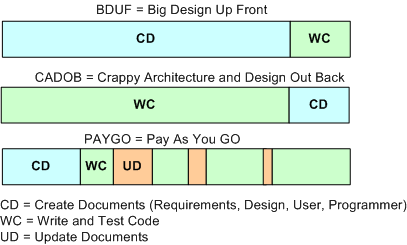
Prior to the agile “revolution“, most orgs spent a lot of time generating software documentation during the front end of a project. The thinking was that if you diligently mapped out and physically recorded your design beforehand, the subsequent coding, integration, and test phases would proceed smoothly and without a hitch. Bzzzt! BDUF (bee-duff) didn’t work out so well. Religiously following the BDUF method (a.k.a. the waterfall method) often led to massive schedule and cost overruns along with crappy and bug infested software. Bummer.

In search of higher quality and lower cost results, a well meaning group of experts conceived of the idea of “agile” software development. These agile proponents, and the legions of programmers soon to follow, pointed to the publicly visible crappy BDUF results and started evangelizing minimal documentation up front. However, since the vast majority of programmers aren’t good at writing anything but code, these legions of programmers internalized the agile advice to the extreme; turning the dials to “10”, as Kent Beck would say. Citing the agile luminaries, massive numbers of programmers recoiled at any request for up front documentation. They happily started coding away, often leading to an unmaintainable shish-CADOB (Crappy Architecture and Design Out Back). Bozo managers, exclusively measured on schedule and cost performance by equally unenlightened corpocratic executives, jumped on this new silver bullet train. Bzzzt! Extreme agility hasn’t worked very well either. The extremist wing of the agilista party has in effect regressed back to the dark ages of hack and fix programming, hatching impressive disasters on par with the BDUF crews. In extreme agile projects where documentation is still required by customers, a set of hastily prepared, incorrect, and unusable design/user/maintenance artifacts (a.k.a. camouflage) is often produced at the tail end of the project. Boo hoo, and WAAAAGH!
As the previously presented figure illustrates, a third, hybrid pattern of software-intensive system development can be called PAYGO. In the PAYGO method, the coding/test and artifact-creation activities are interlaced and closely coupled throughout the development process. If done correctly, progressively less project time is spent “updating” the document set and more time is spent coding, integrating, and testing. More importantly, the code and documentation are diligently kept in synch with each other.
An important key to success in the PAYGO method is to keep the content of the document artifact set at a high enough level of abstraction “above” the source code so that it doesn’t need to be annoyingly changed with every little code change. A second key enabler to PAYGO success is the ability and (more importantly) the will to write usable technical documentation. Sadly, because the barriers to adoption are so high, I can’t imagine the PAYGO method being embraced now or in the future. Personally, I try to do it covertly, under the radar. But hey, don’t listen to me because I don’t have any credentials, I like to make stuff up, and I’ve been told by infallible and important people that I’m not fit to lead 🙂
The only way to learn how to write is by wrote.
Stacks And Icebergs
The picture below attempts to communicate the explosive growth in software infrastructure complexity that has taken place over the past few decades. The growth in the “stack” has been driven by the need for bigger, more capable, and more complex software-intensive systems required to solve commensurately growing complex social problems.

In the beginning there was relatively simple, “fixed” function hardware circuitry. Then, along came the programmable CPU (Central Processing Unit). Next, the need to program these CPUs to do “good things” led to the creation of “application software”. Moving forward, “operating system software” entered the picture to separate the arcane details and complexity of controlling the hardware from the application-specific problem solving software. Next, in order to keep up with the pace of growing application software size , the capability for application designers to spawn application tasks (same address space) and processes (separate address spaces) was designed into the operating system software. As the need to support geographically disperse, distributed, and heterogeneous systems appeared, “communication middleware software” was developed. On and on we go as the arrow of time lurches forward.
As hardware complexity and capability continues to grow rapidly, the complexity and size of the software stack also grows rapidly in an attempt to keep pace. The ability of the human mind (which takes eons to evolve compared to the rate of technology change) to comprehend and manage this complexity has been overwhelmed by the pace of advancement in hardware and software infrastructure technology growth.
Thus, in order to appear “infallibly in control” and to avoid the hard work of “understanding” (which requires diligent study and knowledge acquisition), bozo managers tend to trivialize the development of software-intensive systems. To self-medicate against the pain of personal growth and development, these jokers tend to think of computer systems as simple black boxes. They camouflage their incompetence by pretending to have a “high level” of understanding. Because of this aversion to real work, these dudes have no problem committing their corpocracies to ridiculous and unattainable schedules in order to win “the business”. Have you ever heard the phrase “aggressive schedule”?
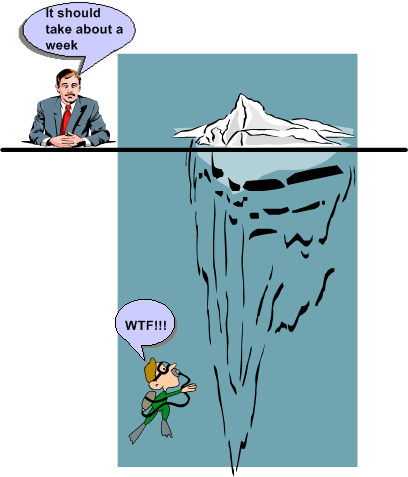
“You have to know a lot to be of help. It’s slow and tedious. You don’t have to know much to cause harm. It’s fast and instinctive.” – Rudolph Starkermann
Metrics Dilemma
“Not everything that counts can be counted. Not everything that can be counted counts.” – Albert Einstein.
When I started my current programming project, I decided to track and publicly record (via the internal company Wiki) the program’s source code growth. The list below shows the historical rise in SLOC (Source Lines Of Code) up until 10/08/09.
10/08/09: Files= 33, Classes=12, funcs=96, Lines Code=1890
10/07/09: Files= 31, Classes=12, funcs=89, Lines Code=1774
10/06/09: Files= 33, Classes=14, funcs=86, Lines Code=1683
10/01/09: Files= 33, Classes=14, funcs=83, Lines Code=1627
09/30/09: Files= 31, Classes=14, funcs=74, Lines Code=1240
09/29/09: Files= 28, Classes=13, funcs=67, Lines Code=1112
09/28/09: Files= 28, Classes=13, funcs=66, Lines Code=1004
09/25/09: Files= 28, Classes=14, funcs=57, Lines Code=847
09/24/09: Files= 28, Classes=14, funcs=53, Lines Code=780
09/23/09: Files= 28, Classes=14, funcs=50, Lines Code=728
09/22/09: Files= 28, Classes=14, funcs=48, Lines Code=652
09/21/09: Files= 26, Classes=10, funcs=35, Lines Code=536
09/15/09: Files= 26, Classes=10, funcs=29, Lines Code=398
The fact that I know that I’m tracking and publicizing SLOC growth is having a strange and negative effect on the way that I’m writing the code. As I iteratively add code, test it, and reflect on its low level physical design, I’m finding that I’m resisting the desire to remove code that I discover (after-the-fact) is not needed. I’m also tending to suppress the desire to replace unnecessarily bloated code blocks with more efficient segments comprised of fewer lines of code.
Hmm, so what’s happening here? I think that my subconscious mind is telling me two things:
- A drop in SLOC size from one day to the next is a bad thing – it could be perceived by corpo STSJs (Status Takers and Schedule Jockeys) as negative progress.
- If I spend time refactoring the existing code to enhance future maintainability and reduce size, it’ll put me behind schedule because that time could be better spent adding new code.
The moral of this story is that the “best practice” of tracking metrics, like everything in life, has two sides.
Complexity Explosion
I’m in the process of writing a C++ program that will synthesize and inject simulated inputs into an algorithm that we need to test for viability before including it in one of our products. I’ve got over 1000 lines of code written so far, and about another 1000 to go before I can actually use it to run tests on the algorithm. Currently, the program requires 16 multi-valued control inputs to be specified by the user prior to running the simulation. The inputs define the characteristics of the simulated input stream that will be synthesized.
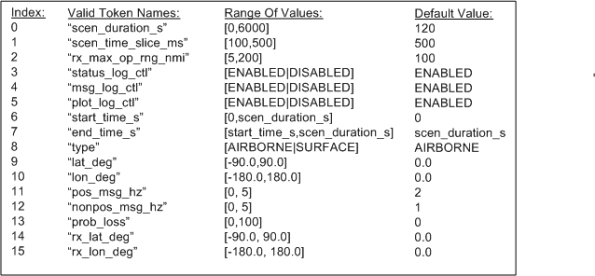
Even though most of the control parameters are multi-valued, assume that they are all binary-valued and can be set to either “ON” or “OFF” . It then follows that there are 2**16 = 65536 possible starting program states. When (not if) I need to add another control parameter to increase functionality, the number of states will soar to 131,072, if, and only if, the new parameter is not multi-valued. D’oh! OMG! Holy shee-ite!
Is it possible to setup the program, run the program, and evaluate its generated outputs against its inputs for each of these initial input scenarios? Never say never, but it’s not economically viable. Even if the setup and run activities can be “automated”, manually calculating the expected outputs and comparing the actual outputs against the expected outputs for each starting state is impractical. I’d need to write another program to test the program, and then write another program to test the program that tests the program that tests the first program. This recursion would go on indefinitely and errors can be made at any step of the way. Bummer.
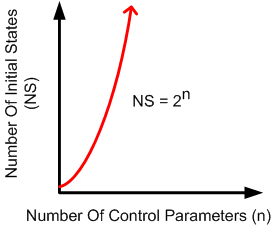
No matter what the “experts” who don’t have to do the work themselves have to say, in programming situations like this, you can’t “automate” away the need for human thought and decision making. Based on knowledge, experience, and more importantly, fallible intuition, I have to judiciously select a handful of the 65536 starting states to run. I then have to manually calculate the outputs for each of these scenarios, which is impractical and error-prone because the state machine algorithm that processes the inputs is relatively dense and complicated itself. What I’m planning to do is visually and qualitatively scan the recorded outputs of each program run for a select few of the 65536 states that I “feel” are important. I’ll intuitively analyze the results for anomalies in relation to the 16 chosen control input values.
Got a better way that’s “practical”? I’m all ears, except for a big nose and a bald head.
“Nothing is impossible for the man who doesn’t have to do it himself.” – A. H. Weiler
Four Or Two?
Assume that the figure below represents the software architecture within one of your flagship products. Also assume that each of the 6 software components are comprised of N non-trivial SLOC (Source Lines Of Code) so that the total size of the system is 6N SLOC. For the third assumption, pretend that a new, long term, adjacent market opens up for a “channel 1” subset of your product.
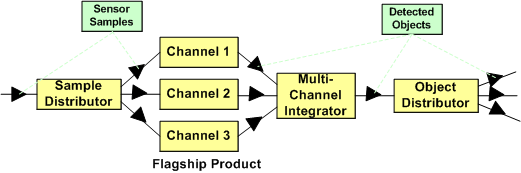
To address this new market’s need and increase your revenue without a ton of investment, you can choose to instantiate the new product from your flagship. As shown in the figure below, if you do that, you’ve reduced the complexity of your new product addition by 1/3 (6N to 4N SLOC) and hence, decreased the ongoing maintenance cost by at least that much (since maintainability is a non-linear function of software size).
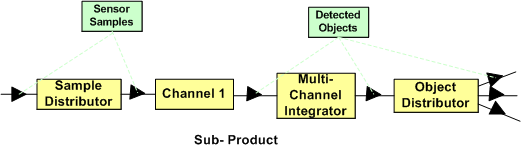
Nevertheless, your new product offering has two unneeded software components in its design: the “Sample Distributor” and the “Multi-Channel Integrator”. Thus, if as the diagram below shows, you decide to cut out the remaining fat (the most reliable part in a system is the one that’s not there – because it’s not needed), you’ll deflate your long term software maintenance costs even further. Your new product portfolio addition would be 1/3 the original size (6N to 2N SLOC) of your flagship product.
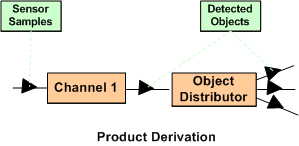
If you had the authority, which approach would you allocate your resources to? Would you leave it to chance? Is the answer a no brainer, or not? What factors would prevent you from choosing the simpler two component solution over the four component solution? What architecture would your new customers prefer? What would your competitors do?

Why am I here?
WTF?
Meh!
D'oh!

My BTC Address



 Bulldozer00's Blog