Archive
C++ Predictability
Did you know that…

I clipped this snippet from the slides that accompanied this interview: “David Intersimone of Embarcadero interviews Bjarne Stroustrup to to kick off their CodeRage 7 conference.”
Boulders And Pebbles
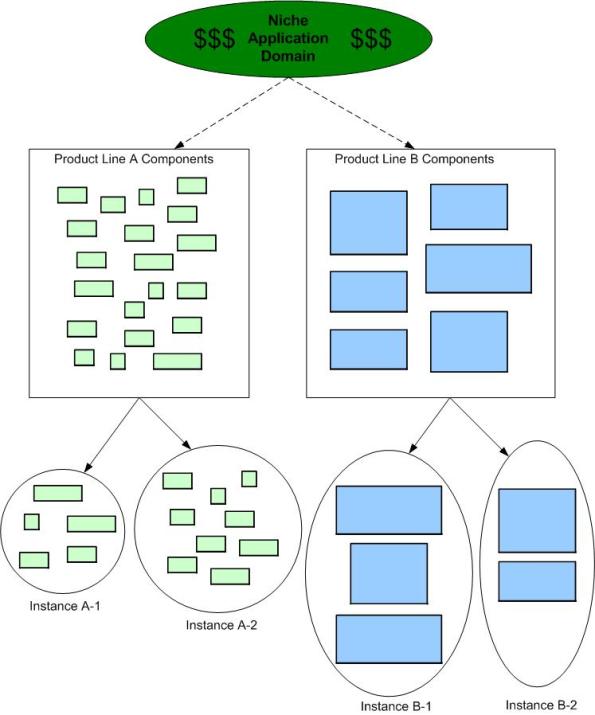
When embarking on a Software Product Line (SPL) development, one of the first, far-reaching cost decisions to be tackled is the level of “granularity” of the component set. Obviously, you don’t want to develop one big, fat-ass, 5 million line monstrosity that has to have 1000s of lines changed/added/hacked for each customer “instantiation“. Gee, that’s probably how you operate now and why you’re tinkering with the idea of an SPL approach for the future.
On the other hand, you don’t want to build 1000s of 10K-line pieces that are a nightmare for composition, configuration, versioning and integration. For a given domain, there’s a “subjective” sweet spot somewhere between a behemoth 5M-line boulder and a basket of 10K-line pebbles. However, if you’re gonna err on one side or the other, err on the side of “bigger“:
…beware of overly fine-grained components, because too many components are hard to manage, especially when versioning rears its ugly head, hence “DLL hell.” – Martin Fowler (UML Distilled)
The primacy of system functions and system function groups allows a new member of the product line to be treated as the composition of a few dozen high-quality, high-confidence components that interact with each other in controlled, predictable ways as opposed to thousands of small units that must be regression tested with each new change. Assembly of large components without the need to retest at the lowest level of granularity for each new system is a critical key to making reuse work. – Brownsword/Clements (A Case Study In Successful Product Line Development)
Holiday Cheer!
From the cast and crew at Bulldozer00.com:

We Must!
I don’t have a source link for this brilliant graphic, but I just HAD to re-hoist it on here.
Time For A Toga Party!

Three Degrees Of Distribution
Behold the un-credentialed and un-esteemed BD00’s taxonomy of software-intensive system complexity:
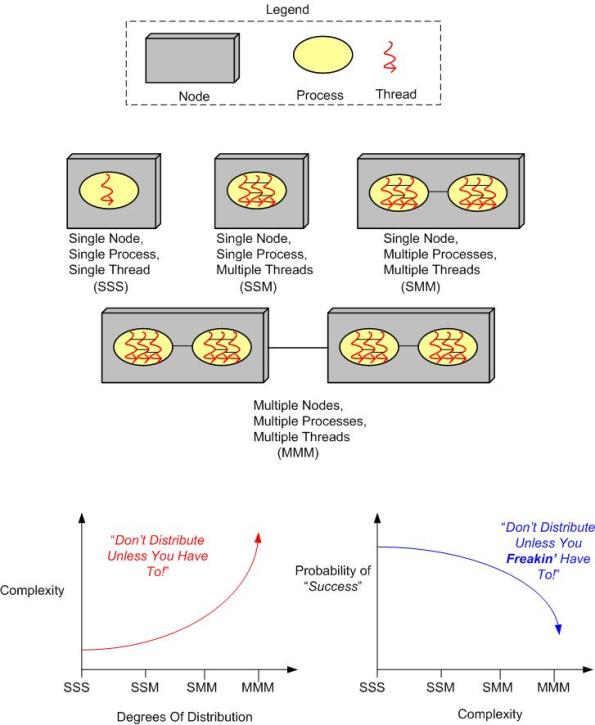
How many “M”s does the system you’re working on have? If the answer is three, should it really be two? If the answer is two, should it really be one? How do you know what number of “M”s your system design should have? When tacking on another “M” to your system design because you “have to“, what newly emergent property is the largest complexity magnifier?
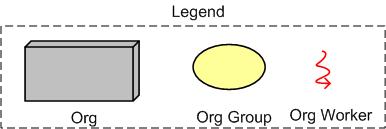
Now, replace the inorganic legend at the top of the page with the following organic one and contemplate how the complexity and “success” curves are affected:
Insane and Inefficient
I can remember the “good ole days” when I purchased and read one book at a time. I would immerse myself whole-heartedly into the book’s subject matter until I finished it in a matter of days. But ever since I bought my first e-reader (Sony PRS-500) several years ago, I’ve become addicted to buying and reading several books simultaneously. For example, here is the current set of books that I’m currently reading on my Kindle Fire HD:

Like multi-tasking, this multi-reading process is insane and inefficient. I don’t absorb the material as deeply, reading is not as fun as it used to be, and I can’t seem to kick the freakin’ habit. Does anyone know of a 12 step program out there that cures this scourge?

A Showstopper And A Nuisance
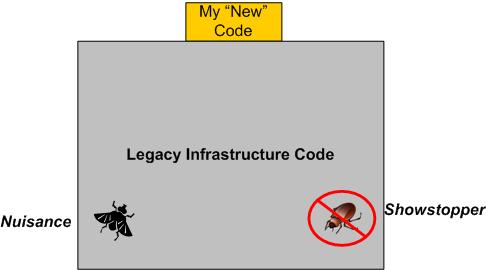
I recently spent 3.5 days hunting down and squashing a “showstopper” bug that ended up being a side effect of an earlier fix that I had made to eradicate a long-standing “nuisance” bug.
SIDEBAR: The nuisance bug occurred only during system shutdown. The system would crash on exit, but no data was lost or corrupted. It was long thought to be an “out of sequence” object destruction problem, but because hundreds of lines of nested destructor code are called during shutdown in multiple threads of execution and the customer never formally reported the bug (because the system is very rarely shutdown), it’s annihilation was put on the shelf – until I “fixed” it.
When I was initially told about the showstopper, I was confounded because the bug seemed to be located somewhere in the code of a simple feature that I had thought I tested pretty thoroughly. And yet, there it was, plainly obvious and easily reproducible – a crash that happens during runtime whenever a specific sequence of operator actions are performed. WTF?
With the system model below embedded in my genius mind, I thought the bug HAD to be located somewhere in the massive, preexisting, 150K line legacy code base. After all, the number of code lines I added to the beast in order to implement the feature was so small and unassuming that the odds favored my hypothesis.

Even though my hypothesis was that the new code I added had uncovered and triggered some other dormant bug deep in the bowels of the software, I first inspected the measly few lines I recently added to the code base. Of course, the inspection yielded no “aha, there it is” moment. Bummer.
Next, I fired up the debugger, sprinkled a bunch of breakpoints throughout the code, and stepped through my brilliant and elegantly simple code. I found that when the control of execution descended into the netherworld below my impeccable work, the bug came out of hiding – crash! However, since a bunch of event driven callbacks were triggered each time the execution of control left my code, I couldn’t trace the execution path so easily.
Exasperated that the debugger didn’t tell me exactly where and what the freakin’ bug was, I started reading and reverse engineering (via targeted UML class and sequence diagram sketches) segments of the legacy code. Since it was my first focused foray down into the dungeon, it was a slow going, but beneficial, learning experience.
Finally, after a couple of days of inspection, reverse engineering, and a bazillion debugger runs, I stumbled upon a note written by yours truly in one of the infrastructure callback functions:
“The line of code below was commented out because it triggers a crash on shutdown“.
Bingo, a light went off! Quickly, I uncommented out the line of code and reran the program. Yepp, the bug was gone! As I initially thought, the critter did turn out to be living within the infrastructure, but I had unwittingly put it there a while ago in order to kill the long-standing “nuisance” shutdown bug. Ain’t life grand?
Of course, the tradeoff for re-enabling the line of code that killed the nasty bug is that the nuisance bug is alive and well again. And no, unless I’m directly ordered to, I ain’t gonna go uh huntin’ fer it aginn. No good deed goes unpunished.
Defect Density
ln “Software’s Hidden Clockwork: A General Theory of Software Defects“, Les Hatton presents these two interesting charts:
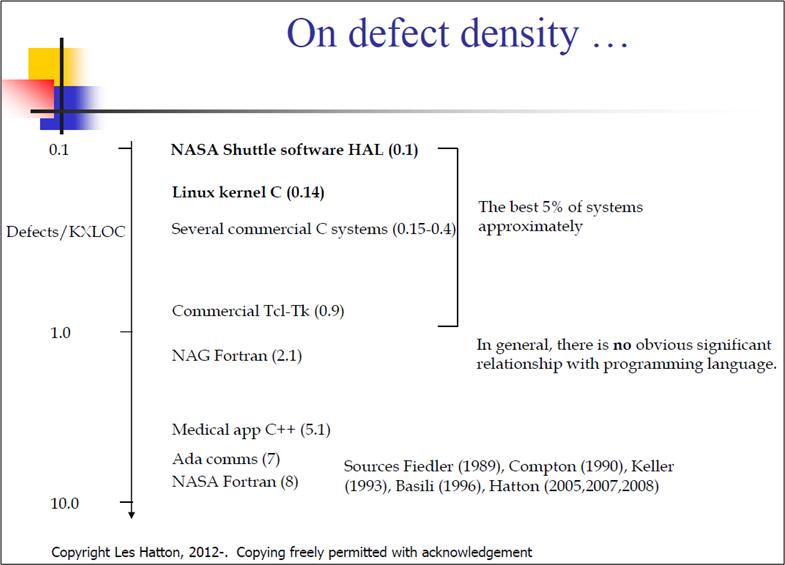
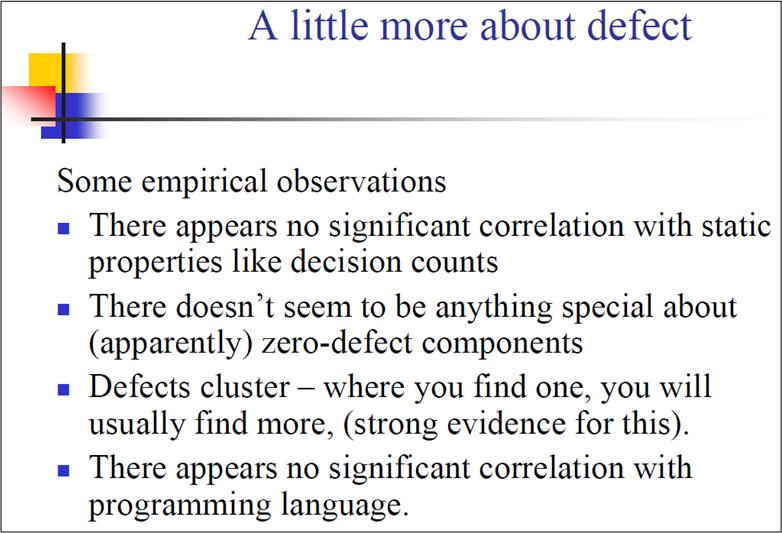
The thing I find hard to believe is that Les has concluded that there is no obvious significant relationship between defect density and the choice of programming language. But notice that he doesn’t seem to have any data points on his first chart for the relatively newer, less “tricky“, and easier-to-program languages like Java, C#, Ruby, Python, et al.
So, do you think Les might have jumped the gun here by prematurely asserting the virtual independence of defect density on programming language?
So, How Do You Know?
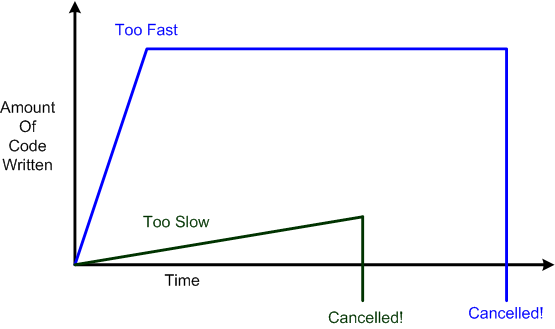
In the software development industry, going too slow can result in nothing getting done in an “acceptable” amount of time and thus, impatient managers cancelling projects. On the other hand, going too fast can result in hackneyed designs, halted downstream progress due to lots of rework on an unmanageable code base, and thus, frustrated managers cancelling projects.
As the figure below shows, the irony is that going too slow can result in less sunk cost due to earlier cancellation than going too fast – which gives a false illusion of great progress till the fit hits the shan.
So, how do you “objectively” know if you’re going too fast or too slow? It’s simple: you freakin’ don’t. However, in a world increasingly dominated by “agile” indoctrination, faster seems to be always equated with better and the tortoise vs. hare parable is heresy.

Why am I here?
WTF?
Meh!
D'oh!

My BTC Address



 Bulldozer00's Blog